
Key Takeaways
- One source of truth. Shopify POS deducts inventory from a single shared database the moment a sale happens — online or in store — preventing overselling.
- Multi-location is native. Stock can be assigned to specific stores, warehouses, or pop-ups; transfers can be initiated, tracked, and received without leaving the POS app on v11.0+.
- Quick Count UI extension lets staff perform cycle counts directly inside the POS app instead of in Shopify Admin — a 2026 addition that closes the biggest workflow gap retailers used to complain about.
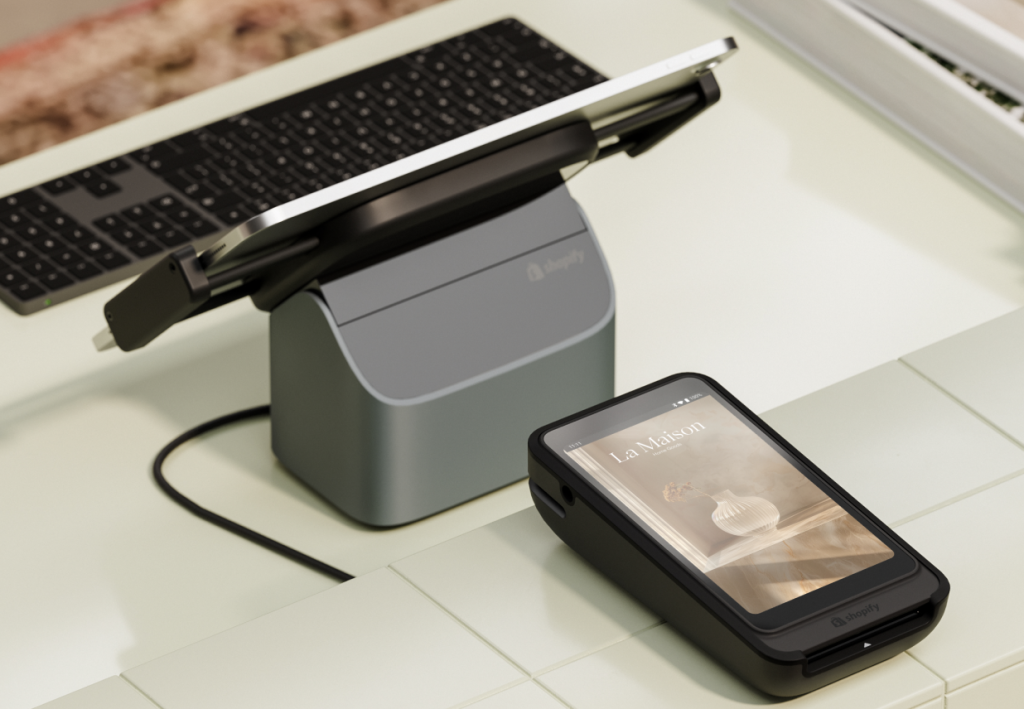
- POS Hub (March 2026) is Shopify’s new wired countertop hub for barcode scanners, receipt printers, and cash drawers — replacing flaky Bluetooth connections.
- Native limits: no bills of materials or raw-material tracking, no AI demand forecasting. Manufacturers and high-volume retailers extend with apps like Cin7, Katana, or Stocky alternatives.
- Best practice non-negotiables: barcode-only entry, ABC cycle counting, locked-down adjustment permissions, and a standardized receiving process.
- The bigger picture: this article is one piece of our complete Shopify POS for Retail 2026 guide — the cluster pillar covering pricing, hardware, setup, comparisons, and omnichannel strategy.
What Is Shopify POS Inventory Management?
Shopify POS inventory management is the unified system retailers use to track stock levels across physical stores and ecommerce channels. It automatically syncs product counts, sales, returns, and adjustments in real time, ensuring that both online shoppers and in-store staff see accurate, up-to-date availability from a single centralized back office.
Shopify’s native POS inventory system connects your in-store point-of-sale hardware with your online storefront. Instead of managing ecommerce inventory in one tool and retail inventory in another, Shopify consolidates product, order, customer, and stock data in a single back office. If an item sells at your physical checkout counter, the system immediately deducts that unit from your overall available inventory, preventing an online shopper from purchasing an out-of-stock item seconds later.
This real-time visibility is the primary value proposition for omnichannel retailers — it transforms stock control from a constant guessing game into a strategic, data-driven advantage. (For the broader business case, see the value of Shopify POS for omnichannel retailers.)
Does Shopify POS Track Inventory?
Yes, Shopify POS tracks inventory natively, but it is important to understand exactly what it can and cannot do out of the box. For most small to mid-sized retailers, Shopify’s built-in tools provide ample visibility. Enterprise operations may eventually hit a ceiling.
Here is a quick breakdown of how Shopify POS inventory tracking functions and where its native limits begin:
- What it tracks automatically: real-time stock deductions upon sale, inventory additions upon receiving or returns, and location-specific stock availability.
- What it supports natively: multi-location inventory routing, manual stock adjustments, basic low-stock alerts, and product transfers between physical stores.
- Where native limits begin: Shopify POS does not natively handle complex manufacturing workflows (like bills of materials or raw material tracking). It also lacks advanced AI-driven demand forecasting and automated purchase order generation without add-ons.
How Shopify POS Inventory Management Works Across Online and In-Store Sales
A successful omnichannel retail strategy relies on fluid data movement. Shopify POS achieves this by treating inventory as a shared resource divided by distinct “locations.” (For a deeper look at the channel architecture, see our guide on building an omnichannel retail strategy.)
Real-time inventory sync
When a transaction occurs — whether a customer buys a sweater online or taps their credit card at your retail counter — the inventory is deducted from the specific location assigned to that sale. If a customer uses a Buy Online, Pick Up In Store (BOPIS) workflow, the inventory is reserved at the local store, preventing floor staff from accidentally selling the same item to a walk-in customer.
Returns, exchanges, and adjustments
Returns and exchanges are notorious for causing inventory discrepancies. Shopify POS simplifies this by tying returns directly to the original order profile. When an item is returned in store, the associate can instantly restock it to that specific location’s inventory count. The system automatically updates the central database, ensuring the item is immediately available for purchase online again.
Recent operational improvements (2026)
Shopify is actively reshaping its retail capabilities. The Shopify POS app v11.0, released in February 2026, rebuilt the core selling flow with a redesigned cart and faster customer search, and crucially, store staff can now fulfill and receive inventory transfers directly within the POS interface — no manager logging into Shopify Admin required. In March 2026, Shopify launched the POS Hub, a wired countertop device that connects to barcode scanners, receipt printers, and cash drawers via USB, replacing the unstable Bluetooth setup that retailers had been complaining about for years. Both updates compound a clear strategic message: offline revenue grew 33% in 2024, and Shopify is investing accordingly.
Key Shopify POS Inventory Features for Retailers
To fully leverage the system, retailers must understand the core features driving daily operations. When utilized correctly, these tools drastically reduce the administrative burden on your team.
- Multi-location inventory: You can assign stock to specific warehouses, retail storefronts, or temporary pop-up locations. This ensures that your online store accurately reflects what is available to ship versus what is available for local pickup.
- Stock transfers: Moving inventory between stores is a routine necessity. Shopify POS allows you to initiate, track, and receive stock transfers directly inside the app on v11.0+, ensuring items in transit are accounted for and not accidentally listed as available.
- Stock counts and cycle counting (with Quick Count): Regular audits are essential for accuracy. Shopify’s Quick Count UI extension lets staff perform physical inventory counts directly inside the POS app, log discrepancies, and adjust stock levels with specific reason codes (e.g., “damaged,” “theft,” or “receiving error”) without ever leaving the sales floor.
- Low-stock alerts: By setting reorder points, managers receive automated notifications when an item drops below a critical threshold, allowing for proactive purchasing.
- Unified reporting: Comprehensive analytics provide insights into sell-through rates, seasonal patterns, and velocity by SKU.
The benefit of these features extends past the back office and onto the sales floor. Fewer stockouts mean less time reconciling on the manager’s laptop, more time on customer service, and stronger trust in the numbers when it is time to reorder.
How to Set Up Shopify POS Inventory Management Step by Step
Implementing a new system requires discipline. To ensure a flawless transition, follow this step-by-step setup process.
Test the system. Before going live, process a test transaction, execute a test return, and perform a mock inventory transfer. Verify that the stock levels update correctly across both the POS interface and your online storefront.
Select the right POS plan. Choose between Shopify POS Lite (included with all Shopify plans, best for occasional pop-ups) and Shopify POS Pro (required for advanced inventory tracking, unlimited staff PINs, and multi-location retail stores). For a side-by-side breakdown, see our guide to what Shopify POS is and how it works.
Download and configure the app. Install the Shopify POS app on your iOS or Android devices. Log in using your admin credentials to sync your existing ecommerce catalog.
Set up locations and products. In your Shopify Admin, navigate to Settings > Locations. Add your physical stores and warehouses. Ensure every product has a unique SKU and barcode, and assign specific inventory quantities to their respective locations.
Configure hardware and payments. Pair your barcode scanners, receipt printers, and card readers (or connect them via USB through the new POS Hub for a more reliable setup). Enable Shopify Payments to ensure a seamless flow of financial data alongside your inventory data.
Define staff permissions. Assign role-based access. Restrict sensitive actions — like manual inventory adjustments or applying heavy discounts — to store managers to maintain data integrity.
Across the Shopify POS installations our team has done for Atlanta retailers, the single biggest source of inventory pain has nothing to do with the software — it is a missing receiving discipline. Shopify will keep your stock accurate to the last unit, but only if every received transfer or PO is scanned in immediately. Boxes that sit in the back room “to be received later” become phantom stockouts on the website, lost sales, and frustrated customers. The Quick Count UI extension and POS Hub releases in 2026 close two of the smaller workflow gaps, but disciplined receiving is still the foundation everything else sits on.
Common Shopify POS Inventory Challenges and How to Solve Them
While Shopify POS is robust, scaling businesses will inevitably encounter friction points. Understanding these limitations early lets you implement the right operational workarounds.
1. Sync delays. Shopify’s internal sync is real-time, but integrating third-party platforms can introduce delays. Some external inventory management systems (IMS) only pull data from Shopify every five minutes. During high-traffic events like Black Friday, a five-minute delay can lead to overselling. Solution: rely on Shopify’s native inventory counts as your source of truth during peak sales, or ensure your third-party IMS uses real-time webhook integrations rather than batch syncing.
2. Manufacturing and bundling limitations. Native Shopify POS does not track raw materials or complex component bundles well. If you sell a custom gift basket, Shopify will track the basket as one SKU, not the individual items inside it. Solution: businesses that manufacture goods should integrate a dedicated ERP or specialized manufacturing app (Katana, Cin7, Fishbowl) to handle bills of materials (BOM) and component-level tracking.
3. Multi-location blind spots. In the past, retail staff had to navigate away from the POS app and into Shopify Admin to manage incoming stock transfers, which slowed everything down. Solution: ensure your devices are on Shopify POS app v11.0 or higher (Feb 2026 release), which lets staff fulfill and receive transfers directly within the POS interface, closing the visibility gap between head office and the sales floor.
Best Practices for Accurate Multi-Location Inventory Control
Technology is only as effective as the processes governing it. To maintain pristine inventory data, implement these best practices across your retail locations:
- Enforce strict barcode scanning. Never allow staff to manually type in SKUs if a barcode scanner is available. Manual entry is the leading cause of inventory discrepancies.
- Conduct regular cycle counts. Do not wait for an annual, store-wide inventory audit. Implement a cycle counting routine using ABC analysis: count your high-value, fast-moving “A” items weekly, “B” items monthly, and slow-moving “C” items quarterly. Quick Count makes this much faster than navigating in and out of Shopify Admin.
- Lock down staff permissions. Only authorized personnel should have the ability to override stock counts. When an adjustment is made, mandate that the employee enter a specific reason code.
- Standardize the receiving process. When a transfer or purchase order arrives, it must be counted and scanned into the system immediately. Inventory sitting in the back room that has not been received digitally creates phantom stockouts on your website.
When to Use Shopify POS Alone vs. Add Inventory Management Apps
Many merchants wonder when they should stick to the native platform and when they should upgrade their tech stack. If you run a single store or a straightforward multi-location retail brand, Shopify POS Pro is likely all you need. As your operation grows, you may need to extend functionality with apps.
Here is a quick comparison of what Shopify handles natively versus what requires an add-on:
| Feature/Requirement | Native Shopify POS (Pro) | Requires Add-on / App |
|---|---|---|
| Real-time stock sync (online & in-store) | ✅ Yes | ❌ No |
| Multi-location inventory tracking | ✅ Yes | ❌ No |
| Stock transfers between stores (in-app on v11.0+) | ✅ Yes | ❌ No |
| Quick Count cycle counting (in POS app) | ✅ Yes (UI extension) | ❌ No |
| Raw materials & manufacturing tracking | ❌ No | ✅ Yes (Katana, Cin7, Fishbowl) |
| Advanced AI demand forecasting | ❌ No | ✅ Yes (Inventory Planner) |
| Custom POS UI checkout modifications | ❌ No | ✅ Yes (custom UI extensions) |
If you require advanced forecasting or complex purchase order management, Shopify’s discontinuation of Stocky has pushed many merchants to evaluate Stocky alternatives with deeper ERP integrations and predictive analytics.
Looking at the broader Shopify POS ecosystem in 2026, we are seeing a meaningful shift toward custom UI extensions. Developers are increasingly extending Shopify POS with bespoke interfaces directly inside the checkout screen, allowing for highly customized loyalty enrollments, dynamic discounting, and clienteling workflows without ever leaving the native POS environment. Quick Count was an early example; expect many more category-specific extensions to follow.
Frequently Asked Questions
Does Shopify POS track inventory?
Yes, Shopify POS automatically tracks inventory in real time. Whenever a product is sold, returned, or exchanged in your physical store, the system instantly updates your stock levels across all your connected locations and your online storefront.
How to keep track of inventory on Shopify?
You keep track of inventory by assigning unique SKUs and barcodes to every product, setting up specific locations in your Shopify Admin, and using the POS app or a barcode scanner to log all sales, receiving, and stock transfers accurately.
Can POS systems track inventory?
Yes, modern cloud-based POS systems are specifically designed to track inventory. They act as a centralized database, deducting stock as sales occur and providing merchants with reporting tools to monitor product velocity, shrinkage, and reorder points.
Does Shopify POS sync inventory in real time?
Yes, Shopify POS syncs inventory in real time. Assuming your device has an active internet connection, an in-store sale will immediately deduct from your global inventory count, preventing online shoppers from buying an out-of-stock item.
What is the difference between Shopify and Shopify POS for inventory management?
Shopify is the overarching ecommerce platform and central database that houses all your product and inventory data. Shopify POS is the specific retail application and hardware interface used by staff in physical stores to process in-person transactions, which then feeds data back into the main Shopify system.
Conclusion
Mastering Shopify POS inventory management is the foundational step toward true omnichannel success. By centralizing your stock data, you eliminate the friction of manual reconciliations, protect your brand from the embarrassment of overselling, and ensure your customers receive a unified shopping experience regardless of where they choose to buy.
Whether you are running a single boutique or a nationwide chain of retail stores, the key to scalability lies in strict operational discipline: regular cycle counts, locked-down adjustment permissions, standardized receiving, and knowing when to extend your native capabilities with the right apps. The 2026 Shopify POS releases (v11.0, Quick Count, POS Hub) close three of the bigger workflow gaps that used to frustrate retail teams — but the discipline matters more than the tooling.
If you need help architecting a multi-location setup, integrating an ERP with Shopify POS, or migrating retail inventory data into a new Shopify store, our team offers Shopify POS installation services for retailers across Atlanta and the US. Reach out for a transparent quote on hardware, software setup, and inventory migration.