
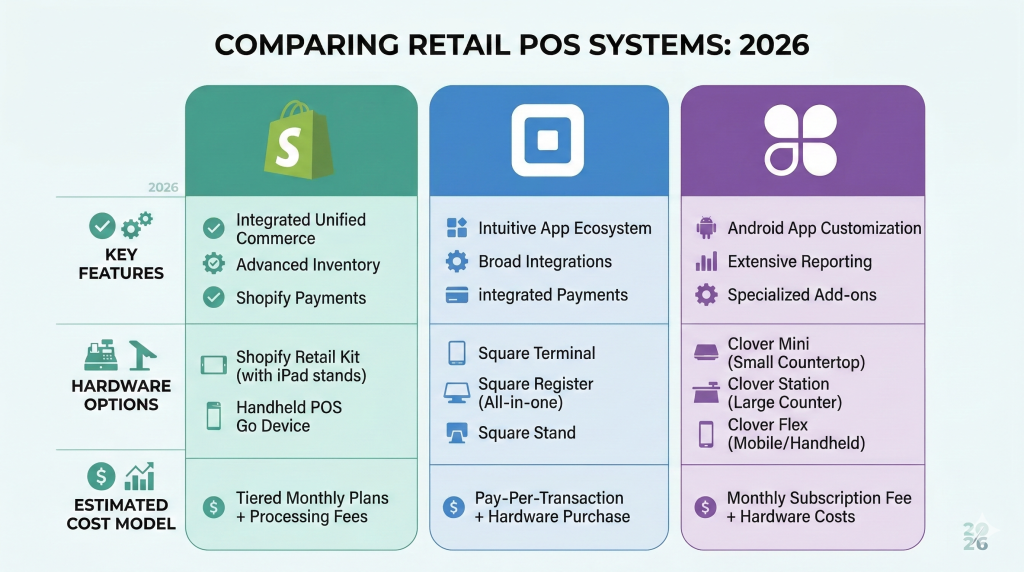
Choosing the right point-of-sale (POS) system is one of the most consequential decisions a modern retailer will make. Today’s POS platforms are no longer just glorified cash registers. Instead, they act as the central nervous system for your entire business. If you are debating Shopify POS, Square, and Clover, you are in the right place. These tools dictate how seamlessly you sync inventory, process payments, and unify your physical and digital storefronts.
You are evaluating the three heaviest hitters in the commerce space. However, despite their shared capabilities, developers built each with fundamentally different priorities. Shopify is the undisputed king of omnichannel retail. Square dominates in user-friendly simplicity. Meanwhile, Clover provides industrial-grade hardware for traditional storefronts.
In this 2026 comparison, we break down the features, hidden costs, and hardware of each platform. By the end, you will have a clear decision framework to choose the best POS system for retail growth.
Key Takeaways
- Shopify POS wins for omnichannel and ecommerce-first retailers — it is the only one of the three with native unified commerce.
- Square wins for low-volume, in-person-first sellers — $0 base software, easiest setup, transparent flat-rate fees.
- Clover wins for traditional, high-volume brick-and-mortar — durable hardware and the option to negotiate interchange-plus rates through your merchant services provider.
- Pricing reality (per location, mid-tier): Shopify POS Pro $89/mo + ecommerce plan; Square Retail Plus $49/mo; Clover bundles run roughly $15–$95/mo depending on reseller.
- Hidden cost to watch: Clover hardware is often sold via 36–48 month non-cancelable leases — read the contract before signing.
- Part of our complete retail stack: see our guides on what Shopify POS is, when Shopify POS makes sense for omnichannel, and how to manage inventory across channels.
- The bigger picture: this comparison is one piece of our complete Shopify POS for Retail 2026 guide — the cluster pillar covering pricing, hardware, setup, inventory, and omnichannel strategy.
Shopify POS vs Square vs Clover: Quick Verdict
When comparing Shopify POS, Square, and Clover, your choice depends on your specific business model. Shopify POS is the best choice for omnichannel and ecommerce-first retailers. Square is the top pick for small businesses needing simple, low-cost in-person selling. Clover is the best fit for retailers who want hardware-first, dedicated brick-and-mortar setups.
At a Glance: Shopify POS vs Square vs Clover
| Feature | Shopify POS | Square | Clover |
|---|---|---|---|
| Best for | Omnichannel & ecommerce-first | Simple setups & mobile sellers | Dedicated brick-and-mortar |
| Monthly software fee | $39–$399+ (ecommerce) + $89/location for POS Pro | $0 to $149/location | ~$14.95 to $94.85+ (varies by reseller) |
| In-person processing | 2.4%–2.6% + 10¢ | 2.6% + 15¢ | ~2.3%–2.6% + 10¢ (varies) |
| Online processing | 2.5%–2.9% + 30¢ | 2.9% + 30¢ | ~3.5% + 10¢ |
| Hardware costs | $49 (reader) to $459 (countertop kit) | $0 (magstripe) to $899 (Register) | $749 (Flex) to $1,899+ (Station Duo) |
| Contract terms | Month-to-month | Month-to-month | Varies — beware of long-term hardware leases |
| Customer support | 24/7 live chat & phone | 24/7 chat; phone in business hours | Varies entirely by reseller |
How Shopify, Square, and Clover Differ
Shopify POS: best for ecommerce-first and omnichannel retail
Shopify began as an ecommerce platform and expanded into physical retail, so its underlying architecture is built around unified commerce. If you want your online store, physical locations, inventory, and customer data to live in a single, perfectly synchronized back office, Shopify is unmatched.
The investment is paying off: Shopify reported that offline revenue grew 33% in 2024, signaling continued investment in brick-and-mortar capabilities. The platform is designed for retailers who view their physical stores and ecommerce sites as two sides of the same coin. For those eyeing multi-location expansion or international selling, Shopify’s pricing tiers scale with your business.
Square: best for simple in-person selling and small business flexibility
Square revolutionized the payment industry by turning smartphones into credit card readers. Its core identity is rooted in removing friction for small business owners. Today, Square offers a highly accessible, all-in-one toolkit.
You can start with a $0 monthly software fee and a free magstripe reader, which makes it the gold standard for pop-up shops, retail boutiques, and service businesses that need to start taking payments immediately. Square wins on out-of-the-box simplicity.
Clover: best for hardware-first brick-and-mortar businesses
Unlike Shopify and Square, Clover is a POS-first system. It is heavily distributed through merchant service providers, banks, and Independent Sales Organizations (ISOs). Clover is built for merchants who want dedicated, proprietary hardware bolted to their countertops.
It is highly versatile across different industries, which makes it a favorite for full-service restaurants, busy cafes, and high-volume traditional retailers. In a direct comparison, Clover wins for businesses that prioritize durable, physical equipment over native ecommerce integration.
Pricing, Processing Fees, and Total Cost of Ownership
The total cost of ownership (TCO) goes far beyond the monthly software subscription. You must factor in payment processing rates, hardware costs, and potential contract traps.
Monthly software fees
Square offers the lowest barrier to entry. The standard POS app is $0 per month. Upgrading to Square for Retail Plus costs $49 per month per location, and Retail Premium runs $149 per month per location for advanced cross-location returns and 24/7 phone support.
Shopify POS requires an active Shopify ecommerce plan (ranging from $39 to $399 per month). While POS Lite is included, serious retailers will need POS Pro. This add-on costs an additional $89 per month, per location.
Clover pricing is notoriously opaque because it is sold through third-party resellers. Monthly software plans typically range from $14.95 to $94.85, depending heavily on the software package and hardware bundle you select.
Payment processing and merchant accounts
Payment processing models dramatically impact your bottom line. Square acts as the Merchant of Record, offering flat-rate pricing — typically 2.6% + 15¢ for in-person transactions. This is incredibly predictable but can become expensive for high-volume merchants.
Shopify uses Shopify Payments (powered by Stripe). They offer flat rates between 2.4% and 2.6% + 10¢ in person, depending on your ecommerce plan tier. Online processing rates range from 2.5% to 2.9% + 30¢. Crucially, if you choose to use a third-party processor with Shopify, you will be hit with an additional transaction fee of up to 2%.
Clover operates differently. Because you purchase Clover through a merchant services provider (like Fiserv or a local bank), you get a traditional merchant account. This allows high-volume businesses to negotiate interchange-plus pricing — a model that can yield significant savings over flat-rate when monthly card volume exceeds roughly $30,000.
Hidden costs and contract risks
Clover’s distribution model is a double-edged sword. While you can negotiate processing rates, you are also at the mercy of your reseller. Hidden costs to watch for include long-term, non-cancelable hardware leases — typically 36–48 months, with early termination fees of $295 to $595 — plus reseller markups on processing and third-party app subscriptions that quickly inflate your monthly bill. Merchant Maverick documents Clover Stations that cost $1,800 to buy outright running $4,000 to $6,000 over a 48-month lease, with merchants typically unable to cancel even if they close the business.
Conversely, Shopify and Square operate on transparent, month-to-month terms with no early termination penalties.
12-month total cost of ownership: three real-world scenarios
Sticker prices on a comparison chart are misleading. Here is what the three platforms actually cost over a year for typical retailers, including software, processing on $250,000 in-person volume, and hardware amortized over 36 months.
| Scenario | Shopify POS | Square | Clover |
|---|---|---|---|
| Solo boutique 1 location, $250K in-person, $50K online | ~$9,200 ($39 plan + Lite (free) + ~$8.5K processing + $200 hardware/yr) | ~$8,600 ($0 base + ~$8.4K processing + $200 hardware/yr) | ~$9,300 ($30/mo + ~$8.4K processing + $600 hardware/yr) |
| 2-location retail $500K combined in-person, light online | ~$17,900 ($79 plan + $89×2 POS Pro + processing + hardware) | ~$16,700 ($49×2 Retail Plus + processing + hardware) | ~$16,500 (varies — interchange-plus may save ~$1K on processing) |
| 5-location omnichannel $1M+ combined, $300K+ online | ~$42,600 (Shopify $399 + $89×5 POS Pro + Shopify Payments at Advanced rate) | ~$37,600 (Square Retail Plus $49×5 + processing — but online store is far weaker than Shopify) | ~$40,000+ (interchange-plus negotiation matters; ecommerce add-ons inflate; lease costs not counted) |
Numbers are illustrative ranges based on published pricing as of April 2026. Actual TCO depends on processor negotiations, hardware financing, and app stack. Note that Square’s lower 5-location TCO assumes Square Online for the ecommerce side — which is far less capable than Shopify’s storefront. The platforms are not strictly apples-to-apples at omnichannel scale.
Across the POS installations our team has done for Atlanta retailers, the most common surprise isn’t the monthly software fee — it’s the gap between Shopify Payments rates and the merchant’s incumbent processor. Switching from a typical 2.9% + 30¢ setup to Shopify Payments at 2.4–2.6% in-person can produce low-four-figure annual savings on modest volume. The second pattern is Clover hardware leases. Long-term, non-cancelable leases sold through resellers and banks are a recurring trap — read the contract before you sign.
Features Compared: Ecommerce, Inventory, Hardware, and Support
Omnichannel and ecommerce capabilities
If your business relies heavily on online sales, this is barely a contest. Shopify is the undisputed leader in omnichannel retail. It natively supports Buy Online, Pick Up In Store (BOPIS), cross-channel returns, and unified customer profiles. When a customer buys a sweater online and returns it in-store, Shopify handles the inventory and financial reconciliation flawlessly. (For a deeper look at how to actually structure this across channels, see our guide on building an omnichannel retail strategy.)
Square also offers a free online store builder (Square Online). It is highly functional but lacks the deep customization and SEO capabilities of Shopify. Clover’s ecommerce capabilities are its weakest link. To sell online effectively with Clover, you generally have to rely on third-party integrations, which can lead to clunky data syncing and fragmented customer experiences.
Inventory and multi-location management
Effective inventory management prevents stockouts and tied-up capital. Shopify POS Pro offers real-time stock syncing, purchase order creation, and low-stock alerts. You can track variants and use advanced retail controls. For massive, highly complex operations, merchants may need to explore Stocky alternatives to handle advanced demand forecasting. (We cover the operational side in detail in our Shopify POS inventory management guide.)
Square for Retail offers solid barcode support, vendor management, and multi-location stock syncing. It is highly intuitive for small to mid-sized teams. Clover provides basic inventory tools, but multi-location inventory and advanced features often require purchasing additional apps from the Clover App Market.
Hardware comparison
Your hardware dictates the physical checkout experience. The best POS system for your retail floor must offer reliable, fast, and durable equipment. The three platforms take very different approaches.
| Hardware angle | Shopify POS | Square | Clover |
|---|---|---|---|
| Approach | BYOD (iOS/Android) + Shopify card readers + Tap to Pay on iPhone/Android | Mix of BYOD (iPad with Square Stand) and proprietary (Register, Terminal) | Proprietary only — Clover software runs on Clover hardware |
| Entry-level reader | $49 Tap & Chip | $10 magstripe (often free) | Clover Go: $49 direct (often $199 via reseller) |
| Mid-tier countertop | $349 POS Terminal | $899 Square Register | $849 Clover Mini |
| Top-tier station | $459+ POS Terminal Countertop Kit | $1,339 Square Register Kit | $1,899+ Clover Station Duo (dual-screen) |
| Handheld for line-busting | iPhone/Android with Tap to Pay (no extra hardware) — POS Go discontinued Aug 2024, sunset Sep 2026 | Square Terminal ($299) — runs full Square POS | Clover Flex ($749) — rugged, restaurant-friendly |
| Offline mode | Yes — keeps selling during outages | Limited — credit card swipes only | Yes — but reseller-dependent |
| Lock-in risk | Low — devices work with other apps | Low — proprietary devices but no leases | High — 36–48 month non-cancelable leases common via reseller channel |
Customer support and reliability
Retail emergencies do not respect business hours. Shopify provides 24/7 phone and live chat support for all paid plans, ensuring you are never left stranded. Square offers 24/7 chat, but phone support is generally restricted to standard business hours unless you pay for a premium plan.
Clover’s support quality is highly variable. Because you are dealing with a reseller, your support experience and training will depend entirely on the specific bank or ISO that sold you the system.
Integrations and app ecosystems
The Shopify App Store has over 17,000 apps. Whether you need an advanced loyalty program, complex accounting syncs, or warehouse management, Shopify has a solution. Square’s App Marketplace is smaller but features high-quality, curated integrations. Clover’s App Market is essential for expanding the POS’s functionality, but many apps come with their own monthly subscription fees.
Migration and switching considerations
Switching POS systems is a major operational undertaking. If you are migrating to Shopify, you must consider data import/export, staff retraining, and hardware replacement. Because this process can be disruptive, many growing brands choose to engage a Shopify agency for the install. Soda Web Media offers Shopify POS installation services for retailers who want the migration handled without losing historical sales data or breaking inventory counts.
Which POS Should You Choose?
Selecting the right system requires matching the software to your specific business scenario.
Best for online-first retailers
Choose Shopify POS. If your brand was born on the internet and you are expanding into physical retail, Shopify keeps your digital and physical worlds aligned. You will never have to worry about overselling an item in-store that just sold out online.
Best for brick-and-mortar stores
Choose Clover. If you run a traditional retail shop or grocery store, Clover is a heavy-duty choice. Its durable hardware and traditional merchant account options make it a strong fit for retail locations that do not prioritize ecommerce.
Best for restaurants and service businesses
Choose Square or Clover. Shopify is built for physical goods, making it less suitable outside retail. Square for Restaurants and Clover Dining both offer specialized tools for table mapping, tipping, and kitchen display systems.
Best for pop-ups and mobile selling
Choose Square. With zero monthly fees, cheap card readers, and an app that runs on your smartphone, Square is the ultimate tool for mobile sellers. For pure simplicity, it beats the competition.
FAQ
Is Shopify POS better than Square POS?
In the Shopify POS vs. Square matchup, Shopify is better for businesses prioritizing e-commerce and omnichannel retail. It offers superior inventory syncing between physical and digital stores. However, Square POS is better for small, in-person-only businesses due to its free software and simpler setup. We often get asked about Shopify POS vs. Square vs. Clover when merchants want to switch platforms.
What POS system is better, Clover or Square?
Square is better for startups needing predictable flat-rate pricing and easy onboarding. Clover is better for established, high-volume brick-and-mortar stores. It offers dedicated, durable hardware and the ability to negotiate interchange-plus processing rates.
Is Shopify discontinuing POS?
No, Shopify is not discontinuing its POS system. In fact, Shopify is heavily investing in brick-and-mortar retail. They continuously expand their proprietary hardware lineup, such as the Shopify POS Go.
Is Clover or Shopify better?
When looking at Shopify POS vs. Clover, Shopify is better for retailers selling across multiple channels. It provides seamless integration between online and in-store sales. Clover is better for traditional, physical-only storefronts that prefer robust, all-in-one hardware stations.
Is Shopify POS cheaper than Square?
Generally, no. Many merchants researching Shopify POS vs. Square wonder about monthly costs. Square is cheaper to start because its base POS app is free. You only pay processing fees. Shopify POS requires an active monthly e-commerce subscription, plus an additional $89/month per location for the advanced features of POS Pro.
How much does Square charge compared to Shopify?
When you compare Shopify POS vs. Square, flat-rate processing is a major factor. For in-person transactions, Square charges a standard flat rate of 2.6% + 15¢. Shopify charges between 2.4% and 2.6% + 10¢ depending on your subscription tier. While Shopify’s per-transaction rate is slightly lower, Square’s lack of a monthly software fee makes it cheaper for low-volume sellers.
What are the disadvantages of the Clover POS system?
The main disadvantages of Clover are its lack of native, robust ecommerce tools and its proprietary hardware. A major point in the Shopify POS vs. Clover debate is hardware flexibility. Furthermore, Clover’s reliance on third-party resellers can lead to opaque pricing, hidden fees, and long-term hardware leases.
What are the top 5 POS systems?
The top 5 POS systems for retail and small businesses generally include Shopify POS, Square, Clover, Lightspeed Retail, and Toast. Any comprehensive POS system comparison in 2026 will feature these heavyweights. A comprehensive Shopify POS vs. Square vs. Clover review will always feature these heavyweights.
Which is the best POS software for retail?
If you want the best POS system for retail store operations, Shopify POS is the top choice for omnichannel brands. Lightspeed Retail is excellent for massive, complex inventories. Square is the best software for small, independent boutiques.
What is the best POS for small businesses?
Square is widely considered the best POS for small businesses. Its lack of monthly software fees, transparent flat-rate payment processing, and intuitive interface allow new business owners to start selling immediately.
Which POS is best for omnichannel retail?
Shopify POS is the undisputed leader in omnichannel retail. It provides a single, unified back-office that synchronizes online and in-store inventory, customer profiles, and sales data in real-time.
Conclusion
Choosing between Shopify POS, Square, and Clover ultimately comes down to understanding your primary sales channels and long-term business goals. If you are an online brand expanding into physical retail, Shopify provides the unified commerce experience the other two cannot match.
If you are a small, local business looking for a risk-free, easy-to-use system, Square is your best bet. And if you operate a busy, high-volume physical storefront or restaurant that demands rugged hardware, Clover stands ready to deliver.
Take the time to evaluate your hardware preferences, calculate your estimated payment processing costs, and consider your future ecommerce ambitions. By aligning your POS choice with your operational realities, you will invest in a platform that drives growth rather than hindering it.
If you need help configuring a unified commerce setup, our team offers Shopify POS installation services for retailers across Atlanta and the US. Reach out for a transparent quote on hardware, software setup, and inventory migration.