Replatforming your ecommerce business is a major strategic move. While gaining access to a more stable, scalable infrastructure is exciting, many merchants share a common, paralyzing fear: losing their hard-earned organic search traffic. Figuring out how to migrate from WooCommerce to Shopify without losing SEO rankings requires meticulous planning, technical precision, and a deep understanding of how search engines evaluate site architecture.
To migrate from WooCommerce to Shopify without losing SEO rankings, you must perform a comprehensive pre-migration SEO audit, map every old URL to its new Shopify equivalent, implement permanent 301 redirects, and transfer all metadata. Careful post-launch monitoring ensures search engines correctly index your new site architecture.
If executed poorly, a migration can decimate your organic revenue overnight. However, if you treat the process as a strategic SEO project rather than a simple data transfer, your search visibility will remain secure.
Here is the high-level, step-by-step checklist for an SEO-safe migration:
- Benchmark your current organic traffic, rankings, and technical performance.
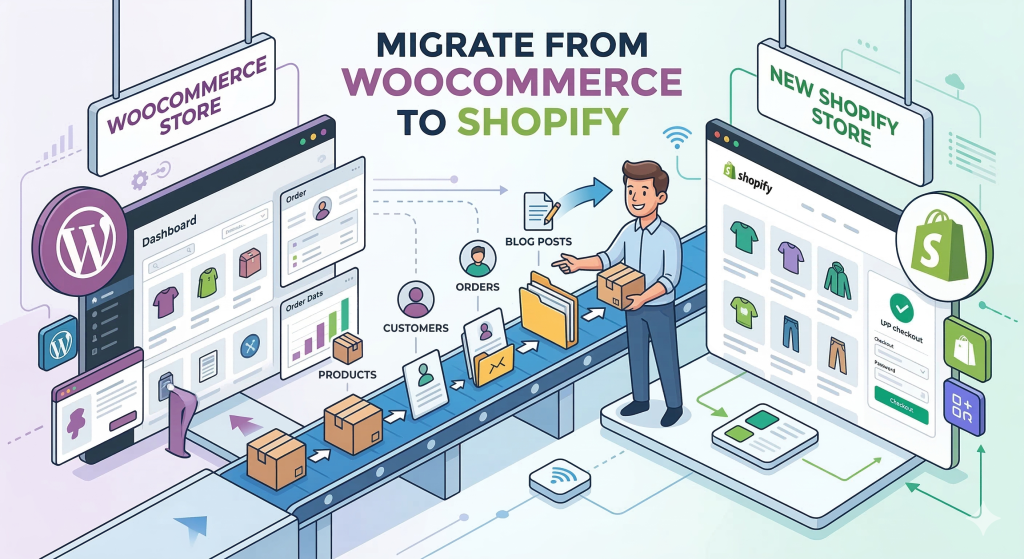
- Export and back up all store data, including products, customers, and blog posts.
- Map every existing WooCommerce URL to its future Shopify destination.
- Migrate all on-page content, metadata, and structured data cleanly.
- Implement and test 301 redirects to preserve link equity.
- Conduct rigorous pre-launch QA in a staging environment.
- Launch the new store, submit updated sitemaps, and monitor indexing.
Why WooCommerce to Shopify Migrations Can Hurt SEO
Platform migrations disrupt rankings even when your business, products, and content remain completely unchanged. Search engines rely heavily on URLs, internal link structures, and crawl paths to understand and rank your website.
When you move from WooCommerce to Shopify, the fundamental architecture of your website shifts. WooCommerce allows for highly customizable permalinks, whereas Shopify enforces a rigid URL structure. Even minor changes to product pages, collections, and blogs can confuse search engine crawlers.
If search engines cannot clearly connect your old pages to your new pages, they will drop your rankings. This SEO loss usually happens because legacy URLs return 404 errors, breaking the user experience and severing the link equity you have built over the years.
To illustrate this structural shift, here is a comparison of common URL patterns between the two platforms:
| Content Type | Common WooCommerce URL Pattern | Default Shopify URL Pattern |
|---|---|---|
| Products | /product/blue-sneakers/ | /products/blue-sneakers/ |
| Categories | /product-category/shoes/ | /collections/shoes/ |
| Pages | /about-us/ | /pages/about-us/ |
| Blog Posts | /blog/summer-trends/ | /blogs/news/summer-trends/ |
Before You Migrate: Build an SEO-Safe Migration Plan
A successful migration is won or lost in the planning phase. Before you move a single product or install a new theme, you must document the exact state of your current website.
Audit your current rankings, traffic, backlinks, and top pages
Start by establishing a clear performance baseline. You need to know exactly what is driving your current success so you can protect it during the transition.
Export all current URLs, including products, categories, blog posts, static pages, and essential images. Next, use Google Analytics (GA4) and Google Search Console to record your top-performing pages by organic traffic, keyword rankings, and revenue generation.
Furthermore, you must audit your backlink profile. Use an SEO tool to identify which pages possess the highest Domain Authority and Page Authority. These high-value URLs are your most critical assets; if their link equity is lost during the move, your overall site authority will plummet.
Finally, document your Core Web Vitals and site speed metrics. Benchmarking these technical indicators ensures you can accurately measure performance improvements once the new Shopify store is live.
Back up store data and export SEO-critical content
Never begin a Shopify store migration without a comprehensive backup of your WooCommerce database. If data is corrupted during the transfer, this backup acts as your safety net.
Export your essential data, including products, variants, images, customers, orders, and reviews. Pay special attention to SEO-critical content. Meta titles, meta descriptions, image alt text, and canonical tags must be exported into a manageable format, such as a CSV file.
Pre-Migration SEO Checklist:
- Crawl the current WooCommerce site to generate a complete URL inventory.
- Export top-performing keywords and their corresponding landing pages.
- Identify pages to preserve, consolidate, or permanently retire.
- Document current canonical tag logic and schema markup setups.
- Secure a full backup of your WooCommerce database and WordPress files.
Map Every Old URL to a New Shopify URL
URL mapping is arguably the most critical task in your entire migration project. This process involves creating a master spreadsheet that pairs every single WooCommerce URL with its future Shopify counterpart.
How to handle products, categories, pages, and blog posts
Shopify forces specific URL paths, meaning exact URL matches are rarely possible. Therefore, you must map your old /product-category/ pages to Shopify’s /collections/ paths, and your old /product/ pages to Shopify’s /products/ paths.
Once your map is complete, you will use it to create 301 redirects. A 301 redirect is the standard method for signaling permanent URL changes to search engines. According to Google Search Central documentation, 301 redirects successfully pass ranking signals from old URLs to new ones, making them a core requirement for an SEO-safe platform migration.
Backlink preservation also relies entirely on these redirects. Identify your highest-value linked pages and ensure they redirect to the most relevant, equivalent new URLs. Never redirect a high-performing product page to the homepage, as search engines may interpret this as a soft 404, stripping away the page’s ranking power.
Migrate Content and SEO Elements Without Losing Relevance
Transferring your catalog is only half the battle. To maintain your search visibility, you must achieve complete content and metadata parity between the old and new platforms.
Titles, meta descriptions, headings, images, schema, and internal links
Search engines rank pages based on the relevance of their content. Therefore, your page titles, meta descriptions, H1 headings, and on-page copy must remain exactly the same during the migration.
Data migration essentials—like products, variants, and images—can be moved efficiently using tools like Cart2Cart or Matrixify. However, be aware that some elements may not transfer cleanly. For instance, custom WordPress fields or complex product variant logic often require manual adjustments in Shopify.
Image optimization is another common failure point. Ensure that image alt text is preserved during the transfer, as this directly impacts image search rankings. Similarly, you must meticulously update your internal links. If a blog post links to an old WooCommerce product URL, that link must be updated to reflect the new Shopify /products/ path to prevent redirect chains and preserve crawl efficiency.
Set Up Shopify for SEO Before Going Live
Before launching, you must configure Shopify’s technical SEO settings to ensure search engines can efficiently crawl and index your new site.
Canonicals, sitemap, robots.txt, analytics, speed, and mobile checks
Shopify handles many technical SEO elements automatically, but these defaults require validation. Check that canonical tags point to the primary version of your product pages, preventing duplicate content issues caused by Shopify’s collection-aware URLs.
Review your robots.txt file to ensure you are not accidentally blocking search crawlers from accessing critical product or collection pages. Additionally, validate your structured data (schema markup) for products, reviews, and breadcrumbs using Google’s Rich Results Test.
You must also consider Shopify-specific SEO limitations. Because Shopify forces URL paths like /blogs/news/, migrating a robust WordPress blog can be frustrating. If you rely heavily on organic blog traffic, consider keeping your WordPress blog hosted separately on a subdomain (e.g., blog.yourdomain.com). This allows you to preserve your exact blog URL structures while using Shopify strictly for ecommerce.
If you need expert assistance navigating these platform constraints, investing in professional Shopify SEO services can safeguard your traffic during the transition.
Launch Checklist: What to Test Before and After the Switch
Launch day requires precision, discipline, and rigorous testing. A single misconfigured setting can cause crawl errors to spike and rankings to plummet.
Before flipping the switch, utilize a staging environment to validate your entire setup. Use Screaming Frog documentation and migration tools to crawl the staging site, ensuring all 301 redirects function correctly and no redirect chains exist.
Post-Migration QA Checklist:
- Verify that the old WooCommerce store is completely disabled or hidden behind a password to prevent duplicate indexing.
- Submit the new Shopify XML sitemap directly to Google Search Console.
- Test all tracking scripts, including Google Analytics 4 (GA4) and the Meta Pixel, to ensure data continuity.
- Run a live crawl of the new site to identify and immediately fix any unexpected 404 errors.
- Test mobile usability and page speed on live collection and product templates.
How to Monitor Rankings and Traffic After Migration
Once your new Shopify store is live, the monitoring phase begins. It is entirely normal to experience temporary ranking fluctuations—often referred to as the “Google Dance”—immediately following a migration.
Search engines need time to process your 301 redirects, crawl your new URL structure, and update their indexes. For the first 30 days, monitor Google Search Console daily. Keep a close eye on the “Pages” index report to identify crawl errors, unindexed pages, or soft 404s.
Track your organic traffic and revenue using GA4, comparing post-launch data against your pre-migration benchmarks. If you mapped your URLs correctly and preserved your metadata, any initial dip in traffic should stabilize and recover within 4 to 8 weeks. Ultimately, the performance enhancements provided by Shopify’s infrastructure will position your store for long-term organic growth.
FAQ
Is Shopify or WooCommerce better for SEO?
Both platforms offer strong SEO capabilities, but they approach them differently. WooCommerce offers ultimate flexibility and deeper customization through WordPress plugins. Shopify provides a faster, more secure, and technically sound infrastructure out-of-the-box, which often leads to better Core Web Vitals and mobile performance.
How do you handle a website migration without losing rankings?
To handle a website migration without losing rankings, you must map every old URL to its new destination and implement permanent 301 redirects. Additionally, you must preserve all on-page content, meta titles, descriptions, and structured data to maintain keyword relevance and link equity.
Should I move from WooCommerce to Shopify?
You should move to Shopify if you are tired of managing hosting, troubleshooting plugin conflicts, and handling security updates. Shopify is ideal for scaling ecommerce brands that want a fully managed, high-performance platform, allowing them to focus on marketing and sales rather than technical maintenance.
Can we migrate WooCommerce data to Shopify?
Yes, you can migrate WooCommerce data to Shopify. Products, customers, order history, and blog posts can be transferred using automated migration apps like Matrixify or Cart2Cart. However, customer passwords cannot be migrated for security reasons, requiring users to reset them on the new site.
How long does it take for SEO rankings to recover after migrating to Shopify?
SEO rankings typically recover within 4 to 8 weeks after a properly executed migration. Temporary traffic fluctuations are normal as Google crawls and indexes the new URL structure. If rankings do not recover within 60 days, it usually indicates missing redirects or lost metadata.
Do 301 redirects preserve SEO when moving from WooCommerce to Shopify?
Yes, 301 redirects are the industry standard for preserving SEO during a migration. They inform search engines that a page has permanently moved, passing the vast majority of the original page’s ranking power and backlink equity directly to the new Shopify URL.
Conclusion
Understanding how to migrate from WooCommerce to Shopify without losing SEO rankings is the key to unlocking your brand’s next phase of growth. While the process demands rigorous attention to detail, the long-term benefits of Shopify’s speed, security, and scalability far outweigh the temporary complexities of replatforming.
By meticulously auditing your legacy site, perfectly mapping your URLs, transferring your metadata, and validating your 301 redirects, you protect the organic foundation of your business. Do not let the fear of losing traffic keep you tied to a platform you have outgrown.
If you want to ensure a flawless transition that protects your revenue and accelerates your growth, consider partnering with experts for your WooCommerce to Shopify migration. With the right strategy in place, your new storefront will not just retain its existing search visibility—it will be primed to dominate the search results.