
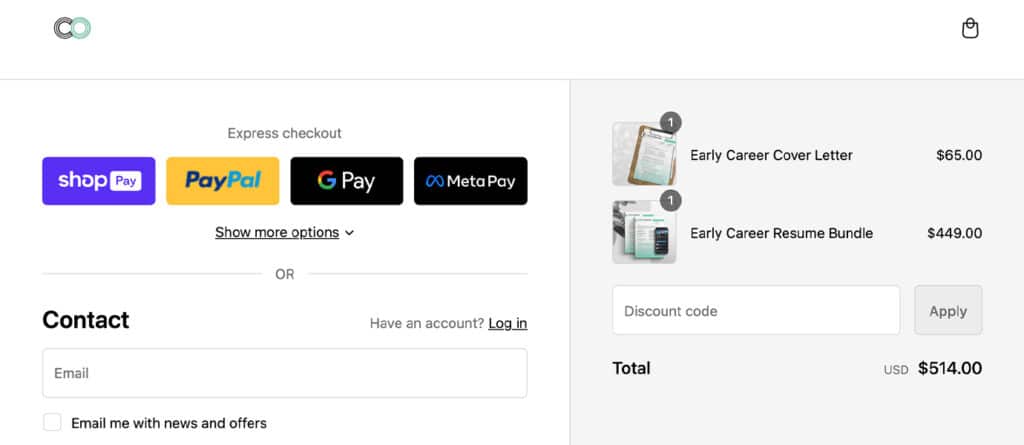
Ecommerce revenue is ultimately won or lost at the finish line. Even if you have a beautifully designed storefront and highly targeted marketing campaigns, a clunky purchasing process will decimate your conversion rates. Implementing a Shopify one-page checkout is one of the most effective ways to reduce friction, eliminate unnecessary page loads, and guide buyers smoothly to the final purchase.
As mobile shopping dominates the market, consumer expectations for speed and convenience have never been higher. Shopify’s redesigned, streamlined checkout experience directly addresses these demands. Furthermore, with the platform’s major architectural shift toward Checkout Extensibility, understanding how to configure and optimize this critical touchpoint is essential for long-term growth.
This comprehensive guide covers everything you need to know about Shopify’s single-page checkout. We will explore why the platform made this shift, how to enable it, the critical deprecation of legacy code, and actionable best practices to maximize your conversion rates.
What Is Shopify One-Page Checkout?
Shopify one-page checkout is an optimized, single-page ecommerce layout that consolidates contact details, shipping options, and payment information into one unified view. By eliminating multiple page loads, it reduces friction, speeds up the buying process, and significantly lowers cart abandonment compared to legacy multi-step checkouts.
Historically, the platform utilized a strict three-step checkout flow: an information collection page, a shipping selection page, and a final payment page. While functional, this legacy approach required customers to endure multiple page loads. Every additional click gave buyers another opportunity to second-guess their purchase and abandon their cart.
The new design fundamentally changes this dynamic. Instead of navigating across separate screens, shoppers can complete their entire transaction fluidly. This layout is heavily influenced by the success of accelerated payment methods, bringing express-style speed to the standard guest checkout experience.
Why Shopify Moved to a One-Page Checkout Experience
The transition to a single-page model was not a purely cosmetic update. It was a strategic, data-driven decision designed to maximize merchant revenue. According to research from the Baymard Institute, the average cart abandonment rate sits at nearly 70%. Consequently, reducing checkout friction is the highest-priority lever for ecommerce optimization.
Shopify partnered with a “Big Three” global management consulting firm to study checkout performance. The results were definitive: Shopify’s checkout outpaces the competition by an average of 15%, and by up to 36%. To maintain this competitive edge, Shopify identified key areas where user experience (UX) could be tightened.
Crucially, mobile shopping has permanently altered buyer expectations. With an estimated 70% of ecommerce traffic originating from smartphones, thumb-typing lengthy forms across multiple pages is scientifically proven to cause user fatigue.
By condensing the flow, Shopify minimizes data entry, leverages browser autofill more effectively, and surfaces total costs earlier in the journey. This eliminates the “sticker shock” of hidden shipping fees that often causes drop-offs on the final step of a multi-page flow.
Shopify One-Page Checkout vs. Multi-Step Checkout
While the single-page layout is the new default, some merchants still debate whether it is universally superior to the legacy multi-step approach. Understanding the pros and cons of each helps clarify when to transition.
Pros of One-Page Checkout:
- Faster Completion: Eliminates wait times between page loads.
- Reduced Friction: Fewer clicks mean a lower cognitive load for the buyer.
- Better Mobile UX: Easier to navigate and review orders on a single smartphone screen.
- Clearer Pricing: Shipping and taxes calculate dynamically on the same screen, building immediate trust.
Cons of One-Page Checkout:
- Increased Scrolling: Consolidating fields means a longer page, which can feel dense if not properly designed.
- Analytics Shifts: Tracking step-by-step drop-offs requires more advanced tracking tools, as page URLs do not change.
- Complex B2B Constraints: Highly complex wholesale orders requiring multiple custom fields may feel cluttered on a single page.
Comparison Overview
| Feature | One-Page Checkout | Multi-Step Checkout |
|---|---|---|
| Speed | Highly accelerated, minimal page loads | Slower, requires sequential loading |
| User Experience | Fluid, mobile-first, consolidated view | Segmented, guided, traditional |
| Analytics | Requires heatmaps/event tracking | Easy URL-based step tracking |
| Customization | App-based, upgrade-safe (Extensibility) | Often relied on deprecated code |
| Best Fit | DTC, mobile-heavy traffic, fast-moving goods | Complex B2B, high-ticket custom quotes |
How to Enable Shopify One-Page Checkout
Switching to the Shopify new checkout is a straightforward process within your store’s admin panel. Shopify has made this layout the default for all newly created stores, but existing merchants can toggle between the two designs easily.
Follow these steps to enable the feature:
- Log in to your Shopify admin dashboard.
- Navigate to Settings in the bottom left corner, then click on Checkout.
- In the Checkout customization section, click Customize next to your active configuration.
- Inside the checkout editor, click the Theme settings (gear icon) on the left sidebar.
- Scroll down to the Checkout layout section.
- Select the one-page checkout option.
- Click Save to publish the changes to your live store.
This feature is available natively to all merchants, even those on the basic Shopify plan. However, if your current setup relies heavily on custom backend code, you must ensure your architecture is compatible before making the switch.
Checkout Extensibility, checkout.liquid, and What Merchants Need to Know
For years, enterprise merchants customized their checkout by editing a core template file known as checkout.liquid. While highly flexible, this method was inherently risky. Custom code often broke during platform updates, created security vulnerabilities, and hijacked the performance of the checkout flow.
To solve this, Shopify introduced Shopify Checkout Extensibility. This modern, app-based framework completely replaces checkout.liquid. It is designed to be upgrade-safe, highly performant, and seamlessly integrated with accelerated payment methods.
Shopify has instituted strict deprecation deadlines for the old architecture. As of August 13, 2024, checkout.liquid was deprecated for the Information, Shipping, and Payment pages. Furthermore, customizations on the Thank You and Order Status pages will be entirely sunset by August 28, 2025.
Migration Checklist for Merchants
If you are transitioning away from legacy code, use this checklist to ensure a smooth migration:
- Audit Existing Customizations: Review your
checkout.liquidfile and Additional Scripts to document all custom fields, tracking pixels, and CSS overrides. - Transition to Shopify Pixels: Move all analytics and marketing tracking from manual scripts into Shopify’s native Customer Events and Web Pixels manager.
- Adopt Checkout UI Extensions: Replace hardcoded upsells or custom fields with app-based UI extensions.
- Implement Shopify Functions: Transition any custom discount logic, shipping rules, or payment hiding scripts (formerly Shopify Scripts) to the new Functions API.
- Test in a Staging Environment: Create a draft checkout profile to rigorously test your new extensibility apps before publishing them live.
If you are undergoing a larger platform move, such as a WooCommerce to Shopify migration, it is highly recommended to build on Checkout Extensibility from day one to avoid future technical debt.
How to Customize Shopify One-Page Checkout
Customizing your checkout ensures that the final step of the buyer journey perfectly matches your brand identity and operational needs. However, the level of customization available depends heavily on your current Shopify plan.
What non-Plus merchants can customize
Merchants on Basic, Shopify, and Advanced plans have robust visual control through the native checkout editor. You can easily modify background colors, typography, button styles, and logo placements to maintain brand consistency.
Functionally, non-Plus merchants can leverage apps Shopify provides through its official marketplace to enhance the experience. You can integrate post-purchase upsell apps, configure basic order notes, and customize shipping or payment methods. You also have full control over the accounts Shopify settings, dictating whether customer accounts are required, optional, or disabled before checkout.
What Shopify Plus merchants can customize
For enterprise brands, Shopify Plus checkout customization unlocks an entirely new tier of functionality. Through the Checkout Extensibility framework, Plus merchants can utilize advanced developer tools to fundamentally alter checkout logic.
- Checkout UI Extensions: Developers can inject custom UI blocks directly into the checkout flow. This includes adding complex custom fields (like B2B purchase order numbers), dynamic upsell carousels, or specific delivery date pickers.
- Shopify Functions: Plus merchants can write custom backend logic to alter how the platform behaves. You can dynamically hide specific payment gateways based on cart contents or create complex, tiered volume discounts that standard Shopify cannot handle out-of-the-box.
- Branding API: This allows for pixel-perfect design control, including custom border radii, nuanced spacing, and advanced typography that standard themes cannot achieve.
If your brand requires this level of bespoke engineering, it is often wise to partner with a certified Shopify developer to build a secure, high-performing checkout app.
Best Practices to Optimize Conversion on One-Page Checkout
Activating the single-page layout is only the first step. To truly maximize revenue, you must actively optimize the experience. Implementing professional Shopify CRO services and adhering to UX best practices will significantly reduce cart abandonment.
1. Simplify and Reduce Form Fields
Every extra keystroke is a barrier to purchase. Only ask for the information strictly necessary to fulfill the order. Hide the “Company Name” or “Address Line 2” fields behind optional toggles, and never force a customer to provide a phone number unless it is required by your shipping carrier.
2. Make Guest Checkout the Default
Forced account creation is a leading cause of abandonment. Always allow users to check out as guests. You can prompt them to save their information and create an account on the “Thank You” page after you have securely captured their payment.
3. Surface Total Costs Immediately
Do not hide taxes or shipping fees until the final click. A major advantage of the single-page layout is the ability to display a dynamically updating order summary. Ensure your shipping threshold (e.g., “Spend $10 more for free shipping”) is clearly visible at the top of the page.
4. Prioritize Accelerated Payment Methods
Integrating Shop Pay, Apple Pay, and Google Pay at the very top of your checkout allows users to bypass manual data entry entirely. Shopify reports that Shop Pay can deliver up to a 91% higher mobile conversion rate compared to standard checkouts.
5. Inject Strategic Trust Signals
Because the customer enters their credit card on the same page as their shipping data, establishing trust is vital. Use Checkout UI extensions to place secure payment badges, money-back guarantees, or concise customer reviews directly below the “Complete Order” button.
How to Measure Performance After Switching
You cannot optimize what you do not measure. After transitioning to the new checkout layout, it is critical to monitor user behavior to ensure the changes positively impact your bottom line. Since the single-page format does not generate separate URLs for each step, traditional funnel tracking in Google Analytics must be adapted.
Consider utilizing a website heatmapping guide to implement session recording tools. These tools allow you to watch exactly where users hesitate, scroll, or experience friction on the page.
Monitor the following key metrics closely:
| Metric | Why It Matters | How to Optimize |
|---|---|---|
| Checkout Completion Rate | The ultimate measure of success. Did the percentage of users who start checkout actually finish? | Reduce form fields and ensure fast page load speeds. |
| Payment Method Usage | Tracks the adoption of digital wallets (Shop Pay, Apple Pay) vs manual credit card entry. | Move accelerated checkout buttons to the very top of the page. |
| Form Error Rate | Indicates if users are struggling with specific fields (e.g., zip code validation). | Implement address autocomplete and clarify error microcopy. |
| Time to Complete | Measures how long a buyer spends on the checkout page. | Enable browser autofill and auto-collapse sections for known buyers. |
If you notice a sudden spike in form errors or a drop in completion rates, investigate your Web Pixels to ensure no third-party tracking scripts are interfering with the page’s performance.
Conclusion
The shift to a Shopify one-page checkout represents a massive leap forward in e-commerce user experience. By consolidating the purchase journey, eliminating slow page loads, and integrating seamlessly with digital wallets, Shopify has engineered a frictionless path to purchase that directly combats cart abandonment.
As the ecommerce landscape grows increasingly competitive, relying on outdated, multi-step flows or deprecated checkout.liquid code is a risk no scaling brand can afford to take. Embracing checkout extensibility not only future-proofs your store but also unlocks powerful, upgrade-safe customization options that can dramatically increase your average order value.
If you are ready to modernize your purchasing flow, implement complex backend logic, or safely migrate away from legacy code, it is highly recommended to hire Shopify agency experts. Professional developers can audit your current setup, build custom UI extensions, and ensure your new checkout is perfectly calibrated to drive maximum revenue.