Generating traffic to your e-commerce store is only half the battle. Once visitors arrive, these pages must turn that hard-earned traffic into tangible revenue. Shopify product page optimization is the key to unlocking this growth. This strategic process improves user experience, builds immediate trust, and directly increases both your conversion rate and overall revenue.
If your store gets high traffic but low sales, your product pages are the bottleneck. Fortunately, fixing them is a high-leverage activity. Integrating proven e-commerce product page best practices here sets the foundation for success.
To help you systematically improve your storefront, here is a foundational checklist of optimization steps:
- Analyze User Behavior: Use heatmaps and analytics to see where users drop off.
- Refine the Above-the-Fold Experience: Ensure pricing, titles, and calls-to-action (CTAs) are immediately visible.
- Upgrade Visual Media: Implement high-resolution images, videos, and 3D models.
- Rewrite Product Copy: Shift from feature-heavy descriptions to benefit-driven storytelling.
- Implement Trust Signals: Add visible customer reviews, ratings, and secure checkout badges.
- Optimize for Mobile: Ensure tap-friendly buttons and fast loading speeds on smartphones.
- Enhance Technical SEO: Optimize meta tags, alt text, and structured data.
In this comprehensive guide, we will explore the exact strategies, design principles, and technical tweaks required to build a high-converting Shopify store.
What Is Shopify Product Page Optimization?
Optimization goes beyond making a page look attractive. It is a data-driven approach to reducing buyer friction. It answers customer questions proactively and guides the user seamlessly toward checkout.
Often, merchants confuse the act of designing a custom page with the ongoing process of optimization. You must know when to customize templates versus optimize existing pages. Smart merchants leverage Shopify themes, specialized apps, and native metafields to build scalable layouts. Effective Shopify product page optimization requires ongoing testing and refinement.
To clarify, here is a breakdown of how these two concepts differ:
| Feature | Custom Product Page | Product Page Optimization |
|---|---|---|
| Primary Goal | Creating a unique, brand-specific layout from scratch. | Improving the performance and conversion rate of an existing page. |
| Execution | Requires web development, Shopify Liquid coding, or page builder apps. | Involves A/B testing, copywriting, image compression, and UX tweaks. |
| Timeline | A one-time project (usually during a site build or redesign). | An ongoing, iterative process based on user data and analytics. |
| Focus Area | Aesthetics, brand identity, and structural layout. | Conversion rates, SEO rankings, page speed, and user experience. |
Ultimately, a beautiful custom build fails without ongoing Shopify product page design tweaks.
Why Optimizing Your Shopify Product Pages Matters
Your product detail page (PDP) acts as your digital salesperson. If it fails to communicate value or answer objections, the customer will simply leave.
Crucially, the Baymard Institute reports that up to 62% of e-commerce sites suffer from mediocre product page user experience (UX). Implementing e-commerce product page best practices gives you a massive competitive advantage.
Here is why dedicating time to optimization is non-negotiable:
- Higher Conversion Rates: Removing friction points makes visitors confidently click “Add to Cart.” If you need professional assistance, exploring Shopify CRO services can yield rapid improvements.
- Lower Customer Acquisition Costs (CAC): Better conversions mean cheaper customer acquisition. This makes your paid advertising campaigns significantly more profitable.
- Improved Organic Search Rankings: Search engines reward pages that offer excellent user experiences and fast load times.
- Reduced Return Rates: Accurate details ensure customers know exactly what they are buying. This significantly reduces costly post-purchase returns.
Following proven product page conversion tips ensures you maximize every ad dollar spent.
The Core Elements of a High-Converting Shopify Product Page
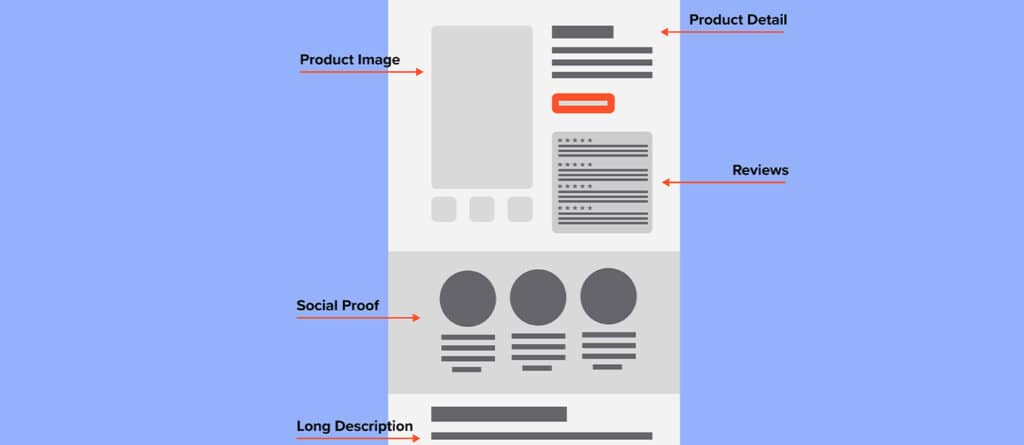
A successful Shopify product page is an ecosystem of interconnected elements. If one piece is missing, the entire conversion architecture can collapse. Strong Shopify product page design relies on several non-negotiable features.
Before diving into the specifics, review these e-commerce product page essentials that every store needs:
- Clear, descriptive product title (H1 tag)
- Prominent, high-contrast “Add to Cart” button
- High-resolution image gallery with zoom functionality
- Benefit-driven, scannable product description
- Transparent pricing with clear shipping and return policies
- Authentic customer reviews and ratings
- Mobile-responsive layout with fast loading speeds
Let us break down how to execute these elements flawlessly.
Above-the-fold content that drives action
The “above-the-fold” section refers to what a user sees immediately upon landing on your page. This prime digital real estate must quickly confirm that the user found the right product. Your above-the-fold essentials must include a clear product title, accurate price, visible variants, and real-time availability.
Pair these details with a prominent Add to Cart CTA to capture immediate interest. These e-commerce product page best practices prevent instant bounces.
Avoid overly clever naming conventions. Use terms that your customers actually search for. Ensure your pricing is entirely transparent. If the product is on sale, display the original price with a strikethrough to highlight the discount.
Finally, your “Add to Cart” or “Buy Now” button must dominate the screen. Use a highly contrasting color that stands out from your brand’s primary palette. Surround this CTA with trust-building microcopy, such as “Free Shipping on Orders Over $50” or “30-Day Money-Back Guarantee.”
Images, video, and variant presentation
Visual media replaces the tactile experience of a physical store. Shoppers cannot touch the fabric or test the durability of your product online. Your imagery must bridge that sensory gap.
Research shows that 67% of consumers consider the quality of a product image to be very important when making a purchasing decision. Modern Shopify product page design demands flawless visual merchandising.
Showcase high-quality product imagery and video by providing multiple angles, zoom functionality, and lifestyle shots. Ensure all media is mobile-friendly so smartphone users get the same immersive experience. Lifestyle photography helps the customer visualize the product in their own life.
A great variant presentation reduces selection friction. Use clear color swatches, intuitive size guides, and variant-linked images. When a customer clicks the “Navy Blue” color swatch, the main gallery should instantly update to display the navy-blue product.
Descriptions, specs, and trust-building content
Do not treat product descriptions as an afterthought. Stuffing the page with dry manufacturer specifications is a massive missed opportunity.
Write product descriptions that convert by prioritizing benefits-first copy and scannable formatting. Clearly list technical specs, sizing details, materials, care instructions, and helpful FAQs. This approach is a cornerstone of modern e-commerce product page best practices. Instead of simply stating a jacket is made of “Gore-Tex,” explain that the customer will “stay completely dry in the harshest rainstorms.”
Because modern web users scan rather than read, break your descriptions into short paragraphs. Use bullet points to highlight key features. Include comprehensive sizing guides to eliminate guesswork.
Layer in social proof and trust signals to eliminate doubt. Feature authentic reviews, star ratings, user-generated content (UGC), testimonials, guarantees, payment badges, and crystal-clear shipping and return policies. Applying these product page conversion tips builds undeniable buyer confidence. A 2023 report indicates that 87% of shoppers check reviews before making a purchase.
How to Optimize Shopify Product Pages for SEO
While conversion rate optimization focuses on the user, SEO focuses on visibility. A beautiful product page is useless if no one can find it.
Master Shopify SEO best practices for product pages by conducting thorough keyword research. Optimize your titles, meta descriptions, clean URLs, and image alt text while building strong internal links. To understand the basics, review what is on-page SEO and how it impacts your rankings.
Instead of a generic URL like yourstore.com/products/shoe-123, use a descriptive, keyword-rich URL like yourstore.com/products/mens-waterproof-hiking-boots. Write descriptive alt text for every product image to boost accessibility and search visibility.
Crucially, you must leverage structured data. Implement schema markup to win rich snippets in search results. This provides search engines with direct data about your product’s price, availability, and aggregate star rating.
Proper Shopify product page optimization blends persuasive copy with technical SEO. If technical markup feels overwhelming, partnering with a specialized Shopify SEO services provider ensures your backend is flawless. Following these e-commerce product page best practices drives predictable organic traffic.
How to Improve UX, Mobile Performance, and Checkout Readiness
The modern e-commerce landscape is overwhelmingly mobile-first. Roughly 60% of all e-commerce purchases in the US are now made on smartphones. Responsive Shopify product page design is absolutely mandatory.
Prioritize mobile optimization and page speed through a responsive layout and tap-friendly design. Use a sticky CTA, serve compressed media, and guarantee fast load times to prevent abandonment. Ensure that your variant selectors and Add to Cart buttons are large enough to be easily tapped with a thumb.
Consider implementing a “Sticky Add to Cart” button. As the user scrolls down to read reviews, this button remains anchored to the bottom of the screen.
Page speed is another critical factor. Slow-loading pages decimate conversion rates. Compress all product images using WebP formats and audit your Shopify apps to remove heavy third-party scripts. These technical product page conversion tips drastically reduce mobile bounce rates.
How to Increase Conversions With Social Proof, Offers, and Recommendations
To push hesitant shoppers over the edge, you must deploy strategic conversion boosters. These psychological triggers reduce purchase anxiety and increase the perceived value of your offer. Deploy powerful conversion boosters like low-stock urgency, product bundles, and recurring subscriptions.
Offer BNPL (Buy Now, Pay Later), enable accelerated checkout, and display relevant related product recommendations. Thoughtful Shopify product page design seamlessly integrates these offers without looking spammy.
Here are several highly effective product page conversion tips:
- Leverage Scarcity and Urgency: Displaying low-stock warnings creates a fear of missing out (FOMO). Countdown timers for next-day shipping cut-offs encourage immediate action.
- Offer Product Bundles: Increase your order value by suggesting complementary items. “Frequently Bought Together” widgets perform exceptionally well.
- Implement Subscriptions: If you sell consumable goods, offering a “Subscribe and Save” option creates recurring revenue.
- Provide Flexible Payment Options: Integrating Buy Now, Pay Later (BNPL) services like Shop Pay Installments or Klarna reduces friction for high-ticket items.
- Enable Accelerated Checkout: Buttons like Apple Pay and Shop Pay allow users to bypass lengthy form fills. This creates a superior Shopify checkout conversion rate.
Deploying these product page conversion tips directly increases your Average Order Value (AOV). Combine these offers with robust user-generated content to create an environment where buying feels community-validated.
How to Measure Product Page Performance and Run A/B Tests
Optimization is not a guessing game. It is a scientific process. Master measurement and testing by tracking key KPIs, analyzing heatmaps, and monitoring scroll depth. Run rigorous A/B testing to drive iterative optimization directly within Shopify.
Begin by setting up Google Analytics 4 (GA4) to track user behavior. For deeper qualitative insights, utilize a website heatmapping guide to understand exactly where users are clicking and abandoning your pages. Continuous Shopify product page optimization relies on accurate, real-time data.
Monitor these four critical metrics closely:
| Key Performance Indicator (KPI) | What It Measures | Why It Matters |
|---|---|---|
| Conversion Rate | The percentage of visitors who complete a purchase. | The ultimate indicator of your product page’s profitability. |
| Bounce Rate | The percentage of visitors who leave without interacting. | Signals poor page speed, confusing layouts, or irrelevant traffic. |
| Average Order Value (AOV) | The average amount spent per transaction. | Indicates the success of your cross-selling and bundling strategies. |
| Add-to-Cart Rate | The percentage of visitors who place an item in their cart. | Identifies if the page is persuasive enough before checkout. |
Once you establish baselines, begin A/B testing. Create two versions of a product page and split your traffic between them. Test one variable at a time, such as a red Add to Cart button against a green one. These data-backed product page conversion tips will compound your revenue over time.
Common Shopify Product Page Optimization Mistakes to Avoid
Even seasoned merchants fall into design traps that actively harm their sales. Avoid common product page mistakes like visual clutter, weak copy, and poor images. Never frustrate users with hidden costs, keyword stuffing, or inconsistent branding.
First, avoid visual clutter. Throwing every possible trust badge and pop-up onto your page creates cognitive overload. Excellent Shopify product page design directs the eye exactly to the buy button.
Second, do not hide the true cost of shipping. Unexpected fees at checkout are the number one cause of cart abandonment. Advertise free shipping boldly, or provide a simple calculator near the price. Ignoring these e-commerce product page best practices will actively harm your sales.
Third, avoid keyword stuffing. Forcing unnatural keywords into your descriptions makes your brand sound robotic. Write for humans first, and search engines second.
Finally, utilize Shopify’s native features properly. Leverage the Shopify 2.0 upgrade to use metafields and metaobjects. This allows you to store dynamic data in clean, collapsible accordion tabs without ruining your layout.
FAQ About Shopify Product Page Optimization
How to optimize Shopify product pages?
Shopify product page optimization requires improving page speed, visual media, and copy. Start by analyzing user behavior to identify friction points. Then, A/B test elements like CTA placement and trust signals to increase your conversion rate.
What is the difference between a custom product page and product page optimization?
Custom Shopify product page design builds the initial layout from scratch to match your brand. Optimization is the ongoing, data-driven process of tweaking that page’s elements—like load speed and SEO—to maximize conversions over time.
How to make the best product page on Shopify?
Follow core ecommerce product page best practices like fast load times and clear information hierarchy. Feature high-resolution variant-linked images and prominently display authentic social proof to build immediate buyer trust.
What should a Shopify product page include?
Effective e-commerce product page best practices dictate a clear title, high-contrast CTA, and visible reviews. It must also feature transparent pricing, high-quality images with zoom, a benefit-driven description, and clear shipping policies.
How do I improve conversion rates on Shopify product pages?
Apply strategic product page conversion tips like sticky CTAs and BNPL options. Reduce checkout friction by offering accelerated checkout, displaying low-stock urgency triggers, and ensuring your page loads in under three seconds.
Conclusion
Mastering Shopify product page optimization is a continuous commitment. It requires understanding your customers and constantly refining their digital experience.
By executing the strategies outlined in this guide—from SEO to Shopify product page design—you will transform your store. You will turn static brochures into high-converting sales engines. Always aim to reduce friction, elevate trust, and provide visual clarity.
If you want to implement these product page conversion tips but lack the time, partner with experts. It may be time to hire a Shopify agency to build a strategy tailored to your specific brand. With the right approach, your product pages will consistently turn casual browsers into loyal, lifelong customers.