
Shopify now supports sub-collections natively. Since July 16, 2026, a collection can pull from other collections, individual variants, automated conditions, hand-picked products, and even apps. Everything lives in one multi-source model that updates itself. The menu tricks, tag systems, and subcollection apps stores relied on for years are now optional.
That first sentence contradicts almost every guide currently ranking for this topic. They were written before July 16. This one covers what actually changed and how to build nested collections step by step in the new admin. It also covers what to do with your workaround stack and what the change does (and does not do) to your SEO.
Key Takeaways
- Nesting is native as of July 16, 2026: a collection can include other collections as sources, so a parent like Living Room stays current as its child collections change. The rebuild is rolling out to all stores on Basic and higher, and existing collections convert automatically.
- Collections are multi-source now: one collection can combine automated conditions, hand-picked products, other collections, and app-fed sources, with exclusions layered on top. The old smart-versus-manual split is gone.
- Variant-level collections are new: you can build a collection from specific variants (only the walnut finishes, only the red colorways), and it works across the online store, POS, and Shop.
- The limits that shape your architecture: up to 5,000 collections with conditions, 100 with variant sources, 50 that contain another collection, and 5 that exclude another collection (Shopify Help Center).
- Your URLs do not change: collection pages keep the flat /collections/handle format, so restructuring carries no redirect work and no ranking risk by itself.
What Changed in Shopify Collections in July 2026?
Shopify rebuilt the collections model and announced it on July 16, 2026 (changelog entry: “Collections now support multi-source and variants”). One collection can now combine automated conditions, hand-picked products, individual variants, other collections, and app-supplied sources. The Help Center confirms availability on Basic plans and higher, with legacy collections converting automatically.
Until this release, every collection was either smart (condition-driven) or manual (hand-picked), and neither type could reference another collection. Merchants asked for real nesting in Shopify Community threads going back years, and the standard answers were menu dropdowns, tag filtering, or an app. The new model replaces that split with five capabilities:
- Multiple sources per collection: conditions, hand-picked products, and other collections coexist in one place, with inclusion and exclusion rules layered on top.
- Nested collections: a parent collection sources child collections, and updates to the children propagate automatically. Shopify’s own example builds a Teaware collection from existing Teapots, Steepers, and Infusers collections.
- Variant sources: collections can target individual variants instead of whole products, and these work across the online store, POS, and Shop.
- App sources: a bestseller or trending app can feed a collection directly instead of you re-curating it every week.
- Sidekick setup: Shopify’s AI assistant can build and configure collections from a plain-language request, including the conditions and automation behind it.
Two practical notes. The rollout is staged, so if your Collections page still shows the legacy smart and manual types, the new model has not reached your store yet. And if custom apps or integrations read or write your collections, point your developer at API version 2026-07, which carries the new model.
| What you wanted to do | Before July 2026 | Now |
|---|---|---|
| Nest one collection inside another | Menu dropdowns pointing at separate, flat collections | Add a Collection source to the parent and connect the child |
| Group specific colors, fabrics, or finishes | Duplicate products, tag every variant, or add an app | A Variants source, with conditions or hand-picked variants |
| Keep a bestsellers collection current | Manual re-curation on a schedule | An App source feeds the collection directly |
| Mix automated rules with hand-picked items | Pick smart or manual per collection, never both | Multiple sources coexist in one collection |
| Carve out a subset (clearance, trade-only) | Tag discipline and careful condition logic | Exclusion rules for products or a whole collection |
How to Create Sub Collections in Shopify (Native Steps)
The build takes minutes per collection once the structure is mapped; the mapping is the real work. Every step below happens in Products → Collections in the Shopify admin, and the UI labels are quoted exactly from Shopify’s create-collection documentation.
Step 1: Map the hierarchy before you open the admin
By the end of this step, you have a written tree of parents and children. Work top-down from how customers shop, not from how your vendor spreadsheets are organized: rooms and product types for a furniture store, project types for a hardware brand. Keep the parent level lean, because a store can hold at most 50 collections that contain another collection. Children are the workhorses; parents are the aisles.
Step 2: Create or clean up the child collections
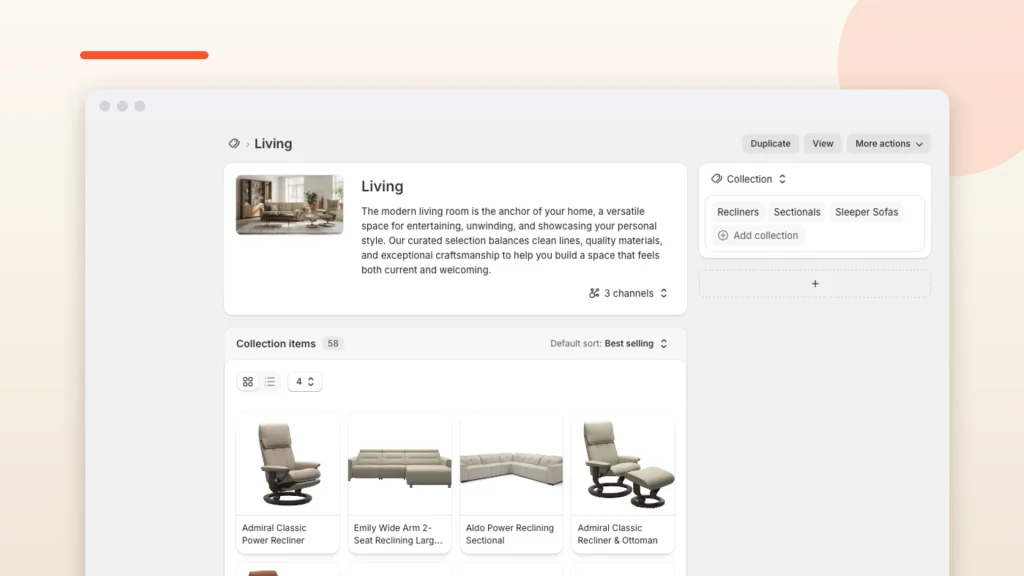
Each child collection should hold one clear product group (Recliners, Sectionals, Sleeper Sofas), built from conditions where possible so it maintains itself. This is also the moment to delete or merge the near-duplicates that accumulated under the old model. Every duplicate you nest now becomes duplicate maintenance later.
Step 3: Build the parent from Collection sources

Click Add collection, title the parent, then add a source with the plus icon. Change the source dropdown to Collection, click Connect a collection, and pick a child from the Select a collection dialog. Repeat for each child. The parent now mirrors its children: add a product to Sectionals and it appears in Living automatically.
Step 4: Layer conditions and exclusions where needed
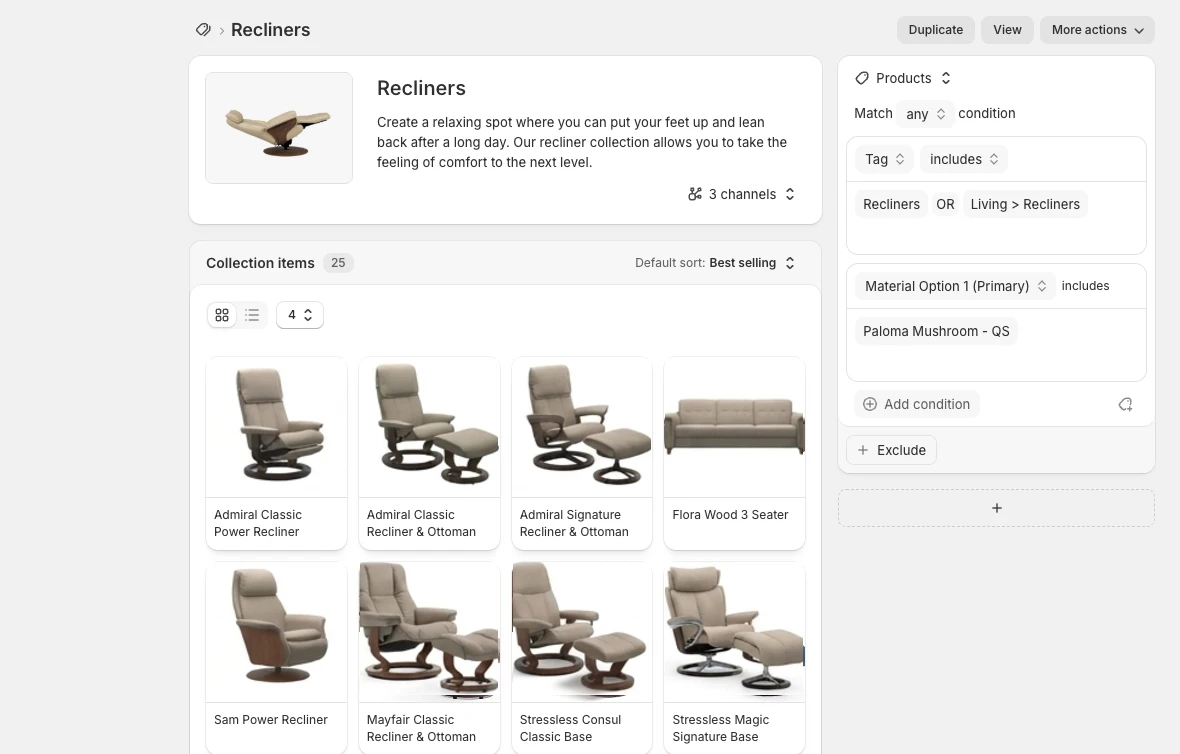
Sources combine, so a parent can hold its child collections plus a hand-picked feature row, or a Variants source limited to specific finishes. To carve subsets out, click Exclude and add conditions, products, or a whole collection. One documented limitation to respect: a single source cannot exclude individual products and another collection at the same time, so split those into separate rules.
Step 5: Wire the storefront: menus still do the displaying
Nesting organizes catalog logic; it does not automatically redraw your storefront. Your navigation menu still controls what customers see, so point menu items (and any collection-list sections in your theme) at the new parents and children. This is where the old menu workaround quietly becomes the right tool again, now backed by real structure instead of standing in for it.
Step 6: Verify propagation and channels
Edit a child collection and confirm the parent updates on the storefront. Then check Set the sales channels on each new collection so trade-only or POS-only groupings stay off the public site. A quick crawl of your menus after the change catches any link still pointing at a collection you merged away in Step 2.
Why This Matters Most for Deep Catalogs
The stores that fought hardest against flat collections are the ones with real taxonomies. Furniture, home décor, hardware: anywhere a catalog naturally splits into rooms, types, materials, and styles. A sofa retailer thinks in Sofas → Sectionals → Sleeper Sectionals, and until now Shopify could only fake that second level with menus and tags.
The structural payoff is that room-based and style-based merchandising stop competing. Living Room can be a parent of product-type children while The Linen Edit pulls only linen-upholstered variants across all of them. Neither needs its own maintenance schedule. That room-and-style architecture is the backbone of our home décor and furniture operator’s playbook, and until now it cost either app fees or weekly curation time to keep honest.
Variant sources deserve special attention in this vertical. Furniture catalogs multiply fast at the variant level: one sofa frame times twelve fabrics. Seasonal color edits used to mean duplicating products or tagging every variant by hand. A Valentine’s red edit or a Paloma Mushroom leather edit is now a rules-based source. And because variant collections work across POS and Shop, a brick-and-mortar showroom can merchandise the same edit at the register.
Read more → For large-catalog operations end to end, freight and lead times included, see the Shopify for furniture stores guide.
Across the home décor and furniture stores our team has built and migrated, collection sprawl is the most common cleanup we inherit. Seasonal duplicates of the same product set. Tag systems only one former employee fully understood. An app whose only job was to fake a category tree. The multi-source model removes the structural reason most of that sprawl existed. The stores that benefit first will be the ones that treat this as a restructuring project, not a new toggle.
What to Do With Your Workaround Stack
Do not rip anything out on day one. The workarounds you built served three different jobs, and the new model replaces only one of them: catalog structure. Here is the triage:
Keep your navigation menus. Menus were never really the workaround; they are still how collections reach the storefront. What changes is what they point at: real parents and children instead of a flat list arranged to look like a hierarchy.
Keep tags for filtering, retire them as structure. Storefront filtering (by fabric, size, price) still runs on your theme’s filter system. But tags whose only purpose was to simulate sub collections can be replaced by sources and conditions, which do not depend on anyone remembering to tag correctly.
Audit your subcollection apps before uninstalling. If an app’s only job was nesting logic, the native model likely covers it now. But many of these apps also render storefront features: category-tree pages, breadcrumb trails, collection sliders. Check which theme sections and templates reference the app before removing it. Where you can, rebuild those displays with your theme’s own collection-list sections.
Does the New Model Change Your Collection SEO?
The restructure itself is SEO-neutral by design. Shopify collection URLs keep the flat /collections/handle format, and nesting lives in the admin model, not the URL path. Existing collections convert with their handles intact. No redirects, no lost rankings. The opportunities and the risks both come from what you do with the new structure.
The opportunity is consolidation. Collection pages are usually a store’s strongest landing pages for non-brand search, which is why collection architecture gets its own section in our Shopify SEO guide. Most stores accumulated near-duplicate collections under the old model. Duplicates split internal links and crowd each other in search. Nesting lets one well-built child serve several parents, so you can merge the duplicates and concentrate that equity.
The risk is the opposite move: minting dozens of thin parent collections because nesting made it easy. A parent with no unique copy, no distinct intent, and the same products as its children is a thin page in 2026, whatever the admin model behind it looks like. Create parents that match how people actually search and browse. Write real descriptions for them, and let the 50-parent limit act as a useful budget. If collection pages carry your rankings, treat the restructure as an SEO project with a before-and-after crawl, whether that is our Shopify SEO team or your own.
Frequently Asked Questions
Can you create sub collections in Shopify?
Yes. Since July 16, 2026, Shopify’s rebuilt collections model lets a collection include other collections as sources. A parent like Living Room can pull from Sofas, Coffee Tables, and Rugs, and it updates automatically as those child collections change. No app or menu workaround is required for the structure itself.
Do I still need a sub collections app?
For catalog structure, no: nesting is native on Basic plans and higher. Apps still earn their keep for what they render on the storefront, such as category-tree pages, breadcrumb trails, or sliders your theme lacks. Audit which templates reference the app before uninstalling anything.
Will nested collections change my collection URLs?
No. Collection pages keep the flat /collections/handle format, and nesting happens in the admin model, not the URL path. Existing collections convert to the new model automatically with the same handles, so no redirects are needed and rankings are not put at risk by the migration itself.
What are the limits on nested collections?
Per Shopify’s documentation: up to 5,000 collections can use conditions, 100 can use variant sources, 50 can contain another collection, and 5 can exclude another collection. The 50-collection cap on parents is the one that shapes site architecture, so reserve nesting for your top browsing level.
What is the difference between collections and categories in Shopify?
Categories are Shopify’s standardized product taxonomy, used for product data, tax, and marketplace feeds. Collections are the storefront groupings you design for browsing and merchandising. Sub collections are built with collections: a parent collection sources its children and appears wherever your navigation links to it.
Restructure While the Advantage Is Fresh
Every store gets the new collections model; few will redesign their architecture around it. Map the hierarchy, rebuild parents from real sources, merge the duplicate collections you have been carrying, and point your menus at structure that maintains itself. The catalog that took a spreadsheet and an app to hold together becomes something one person can reason about.
If you would rather hand it off, our Shopify development team restructures collection architecture on live stores without breaking URLs, menus, or theme sections. Book a discovery call and we will map your current collections against the new model before any build starts.