Shopify SEO is the process of optimizing a Shopify store so it ranks higher in Google and other search engines. Why does it matter? According to Opensend, approximately 40% of ecommerce traffic comes from organic search. SeoProfy reports that ecommerce businesses earn 44.6% of their revenue from organic search. That makes SEO the highest-ROI channel for Shopify merchants.
Yes, Shopify is good for SEO. The platform handles about 80% of technical SEO work automatically, according to Shopify’s own documentation. With over 5.6 million live stores worldwide (per Red Stag Fulfillment) and a 2025 gross merchandise volume of $378 billion (Shopify Q4 2025 Financial Results), it’s one of the most SEO-capable ecommerce platforms available.
That said, Shopify isn’t a set-it-and-forget-it solution for search rankings. The platform gives you a strong technical base. But the work that separates page-one stores from invisible ones falls on you. And if you’re still choosing a platform, our Shopify vs WordPress SEO comparison shows how that automated base stacks up against WordPress’s manual control.
What Shopify Handles Automatically
By default, Shopify takes care of several critical technical SEO elements:
Canonical tags are added to every page, telling Google which version of a URL to index.
XML sitemap generation happens automatically and updates as you add products, collections, and pages.
SSL certificates are included on every store, making sure HTTPS covers your entire domain.
Mobile-responsive themes in the Shopify theme store are built with responsive design.
CDN hosting through Shopify’s global content delivery network speeds up load times worldwide.
Robots.txt is generated with sensible defaults for crawler access.
What You Need to Handle Manually
The remaining 20% of SEO work is where most Shopify stores fall short. You must optimize these elements yourself:
Meta tags (title tags and meta descriptions) for every product, collection, page, and blog post.
Alt text on every product image and content image across your store.
Content creation including product descriptions, collection descriptions, and blog posts.
Structured data beyond what your theme provides by default.
URL handles that are short, descriptive, and keyword-rich instead of auto-generated.
Internal linking between products, collections, blog posts, and pages.
Page speed through app management, image compression, and theme code.
What Shopify Handles vs. What You Control
SEO Element
Shopify Handles Automatically
You Need to Optimize
SSL / HTTPS
Yes
No
XML Sitemap
Yes (auto-generated)
Submit to Google Search Console
Canonical Tags
Yes
Verify on custom/filtered pages
Mobile Responsiveness
Yes (theme-dependent)
Test and adjust per theme
CDN / Hosting Speed
Yes
Optimize images and apps
Robots.txt
Yes
Limited customization via Liquid
Title Tags & Meta Descriptions
No (defaults to page/product title)
Write unique tags for every page
Image Alt Text
No
Write descriptive alt text for all images
Structured Data / Schema
Partial (theme-dependent)
Add Product, FAQ, Breadcrumb schema
URL Handles
Auto-generated (often poor)
Customize before publishing
Content (Descriptions, Blog)
No
Write all content yourself
Internal Linking
No
Build a deliberate linking structure
Backlinks / Off-Page SEO
No
Earn links through outreach and content
The merchants who treat Shopify’s built-in SEO as a starting point, not a finished product, are the ones who consistently rank. The platform gives you a solid foundation. What you build on top determines your organic visibility.
How Do You Set Up a Shopify Store for SEO?
Setting up Google Analytics, Search Console, and a custom domain takes about 30 minutes and forms the foundation of every Shopify SEO strategy. Skipping these steps means you’re optimizing blind, with no data to measure progress or spot problems.
Custom Domain Setup
Your Shopify store launches on a yourstore.myshopify.com subdomain by default. That’s fine for testing, but it won’t work for SEO. A custom domain (yourstore.com) builds brand authority, looks credible to searchers, and keeps all link equity under one root domain.
Purchase your domain through Shopify or connect one from a registrar like Namecheap or GoDaddy. Make sure the non-www version redirects to www (or vice versa) so you do not split authority across two versions of the same site.
Warning: Stores that launch on myshopify.com and switch to a custom domain later without setting up 301 redirects lose all indexed page authority. If Google already indexed your old URLs, you need redirects pointing from myshopify.com paths to your custom domain versions.
Google Analytics 4 Setup
Google Analytics 4 (GA4) is essential for tracking organic traffic and ecommerce conversions. Without it, you’re optimizing without any data.
To set up GA4 on Shopify:
Create a GA4 property in your Google Analytics account.
In Shopify Admin, go to Online Store > Preferences.
Paste your Google Analytics measurement ID (starts with G-).
Enable enhanced ecommerce tracking to capture add-to-cart, checkout, and purchase events.
You can also use Google Tag Manager for more control over event tracking. Either way, verify that ecommerce events are flowing correctly by placing a test order and checking the real-time reports in GA4.
Google Search Console and Sitemap Submission
Google Search Console (GSC) is the single most important free SEO tool for Shopify merchants. It tells you exactly how Google sees your store, which queries drive impressions and clicks, and where technical issues exist.
Verify ownership using the HTML tag method (easiest for Shopify) or DNS verification.
Submit your sitemap by entering sitemap.xml in the Sitemaps section. Shopify auto-generates this at yourdomain.com/sitemap.xml.
Check the Coverage report for any indexing errors and fix them right away.
We recommend checking GSC at least weekly. The Performance report shows which keywords drive traffic. The Pages report reveals indexing problems before they turn into ranking losses.
Google Merchant Center
Most Shopify SEO guides skip this step entirely. Google Merchant Center (GMC) plays a growing role in ecommerce visibility. GMC feeds your product data into Google Shopping results, the Shopping tab, and AI-powered search experiences like Google AI Overviews.
Connect your Shopify store to GMC through the Google & YouTube sales channel app. Once connected, your product feed syncs automatically. Your products become eligible for free listings in Google Shopping results, giving them search visibility beyond standard organic results.
Make sure your product data is clean: accurate titles, full descriptions, correct pricing, and valid GTINs where applicable. Google uses this structured data across multiple surfaces, so accuracy matters.
How Do You Find the Right Keywords for a Shopify Store?
Keyword research drives every Shopify SEO decision, from what to write on product pages to which blog posts to publish first. According to SeoProfy, 87% of consumers say product descriptions are the most important factor in a purchase decision. Choosing the right keywords for those descriptions starts here.
How to Find Keywords Your Customers Actually Search For
Start with the terms your customers already use. Pull data from these sources:
Google Search Console: If your store is live, GSC shows which queries generate impressions. These are real searches where Google considered showing your store.
Google Autocomplete: Type your core product terms into Google and note the suggestions. These reflect high-volume, real-world searches.
Amazon search suggestions: Amazon’s search bar reveals what shoppers look for when they’re ready to buy.
Competitor analysis: Use tools like Ahrefs, Semrush, or DataForSEO to see which keywords your competitors rank for that you don’t.
Customer language: Read your product reviews, support tickets, and social media comments. The exact phrases customers use are often the exact phrases they search.
For most Shopify stores, we start by finding 50 to 100 seed keywords, then expand each seed into long-tail variations. A seed keyword like “leather bag” might expand into “vintage leather bag,” “leather crossbody bag women,” and “handmade leather laptop bag.”
Understanding Search Intent
Not every keyword deserves the same type of page. Search intent determines whether a keyword belongs on a product page, a collection page, or a blog post. There are four primary types:
Transactional: The searcher wants to buy. Examples: “buy leather messenger bag,” “leather bag free shipping.” Target these on product pages.
Commercial: The searcher is comparing options. Examples: “best leather bags for work,” “leather bag brands.” Target these on collection pages or comparison blog posts.
Informational: The searcher wants to learn something. Examples: “how to care for leather bags,” “types of leather for bags.” Target these on blog posts.
Navigational: The searcher is looking for a specific brand or page. Examples: “yourstore leather bags,” “yourstore returns policy.” Make sure your site pages match these queries.
Getting this wrong is one of the most common causes of flat rankings — a blog post chasing “buy” keywords will never outrank a product page, and a product page stuffed with “how to” content confuses both the customer and Google.
Organizing Keywords into Product, Collection, and Content Buckets
Once you have your keyword list, sort every term into one of three buckets:
Bucket
Page Type
Example Keyword
Intent
Product
Product page
“vintage leather messenger bag”
Transactional
Collection
Collection page
“leather bags for men”
Commercial
Content
Blog post
“how to care for leather bags”
Informational
Product
Product page
“brown leather crossbody bag”
Transactional
Collection
Collection page
“best leather laptop bags”
Commercial
Content
Blog post
“leather vs vegan leather durability”
Informational
This bucket system prevents keyword cannibalization, where multiple pages on your store compete against each other for the same term. Each keyword gets one primary page. That page gets the best chance of ranking.
What Are the On-Page SEO Essentials for Shopify?
On-page SEO covers every change you make directly on your Shopify store pages. The #1 result on Google gets about 27% of all clicks, so small on-page improvements can lead to big traffic gains. These are the elements Google reads to decide what each page is about and whether it deserves to rank.
Title Tags and Meta Descriptions
Title tags are the single most important on-page ranking factor. They appear in search results as the clickable blue link and tell Google what your page covers.
Best practices for Shopify title tags:
Keep title tags between 50 and 60 characters to avoid truncation.
Place your primary keyword near the beginning.
Make each title unique across your entire store.
Include your brand name at the end, separated by a pipe (|) or dash (-).
Meta descriptions don’t directly affect rankings, but they heavily influence click-through rate. A strong meta description can be the difference between a click on your result or a competitor’s.
Keep meta descriptions between 150 and 160 characters.
Include your target keyword naturally (Google bolds matching terms).
Write a clear value proposition or call to action.
Avoid duplicate meta descriptions across pages.
In Shopify, you edit title tags and meta descriptions at the bottom of every product, collection, page, and blog post editor under “Search engine listing.”
Heading Hierarchy (H1, H2, H3)
Headings structure your content for both readers and search engines. Shopify automatically uses the page title as the H1 tag, so you should never add a second H1 in your content.
Follow this hierarchy strictly:
H1: One per page. This is your page title (Shopify handles this).
H2: Major sections within the page. Use for primary subheadings.
H3: Sub-sections under an H2. Use for supporting details.
Never skip levels (jumping from H1 to H3, for example). This confuses both search engines and screen readers. Include your target keyword or close variations in at least one H2 heading per page.
URL Handles
Shopify auto-generates URL handles from your product or page titles. The problem is that auto-generated handles are often too long and include unnecessary words.
Good URL handles are:
Short (3 to 5 words maximum)
Keyword-rich and descriptive
Lowercase with hyphens separating words
Free of stop words like “the,” “and,” “of”
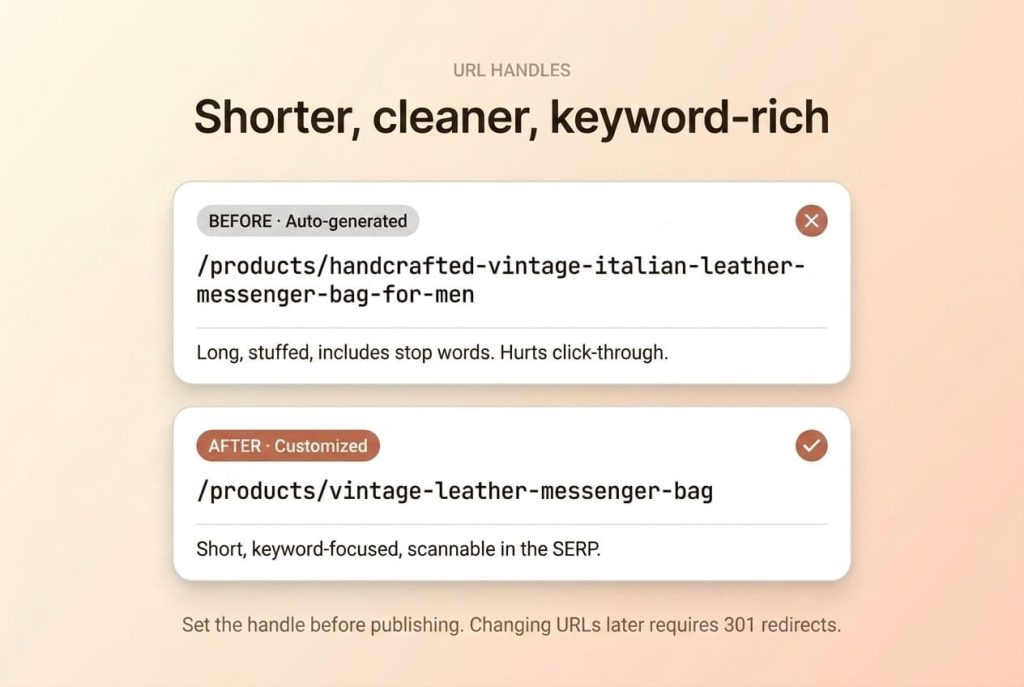
For example, a product titled “Handcrafted Vintage Italian Leather Messenger Bag for Men” might auto-generate as /products/handcrafted-vintage-italian-leather-messenger-bag-for-men. A better handle: /products/vintage-leather-messenger-bag.
Set your URL handle before publishing. Changing URLs after Google indexes them requires 301 redirects, which adds complexity and temporarily hurts rankings.
Image Optimization and Alt Text
Images are one of the most neglected SEO opportunities on Shopify stores. Every image should be optimized for both speed and search visibility.
For speed:
Compress images before uploading. Aim for under 200KB per product image.
Use WebP or JPEG format for product photos. Avoid PNG unless you need transparency.
Use Shopify’s built-in image resizing by specifying dimensions in your theme code.
For search visibility:
Write descriptive alt text for every image. Describe what the image shows, adding your keyword naturally.
Name image files descriptively before uploading (e.g., vintage-leather-messenger-bag-brown.jpg instead of IMG_4521.jpg).
Use unique alt text for each image. Don’t copy-paste the same alt text across multiple images.
Alt text serves two purposes: it helps visually impaired users understand your images through screen readers, and it helps Google understand image content for ranking in Google Images.
Internal Linking Strategy
Internal links connect your store’s pages and distribute ranking authority throughout your site. A strong internal linking strategy helps Google discover all your pages and understand which are most important.
Practical internal linking tactics for Shopify:
Link from blog posts to relevant product and collection pages using descriptive anchor text.
Cross-link related products within product descriptions.
Add “related products” or “you may also like” sections to product pages.
Link from collection descriptions to featured products and related blog posts.
Include breadcrumb navigation so every page links back to its parent category.
Pro Tip: The cheapest SEO win in most Shopify stores is internal linking from blog posts to product and collection pages. If your blog posts don’t link to what you sell, informational traffic never converts.
Product pages are where Shopify SEO turns into revenue. They need enough unique content for Google to understand what you’re selling and enough detail for customers to buy with confidence.
The core levers on every product page:
Unique descriptions — 300+ words, never pasted from the supplier’s catalog.
Product schema — name, price, availability, reviews in JSON-LD.
Multiple images with unique alt text — descriptive, not the product name repeated.
Reviews — fresh customer-written content, plus star ratings in search results.
Get these four right and your product pages do both jobs at once — rank for the keywords that matter and convert the traffic that arrives.
Description templates, schema audit steps, and review-flow setup are covered in our dedicated guide to Shopify product page SEO.
Collection Page SEO
Collection pages are among the most powerful ranking assets in a Shopify store. They target commercial-intent keywords like “men’s leather bags” or “organic skincare products,” which signal a shopper comparing options before buying. Yet most stores leave collection pages empty, with no description and a default title.
Writing Collection Descriptions
Every collection page should have a unique, keyword-rich description. This content gives Google context about what the collection contains and why it should rank for your target term.
A strong collection description includes:
An opening paragraph (60 to 100 words) that naturally includes your target keyword and describes the collection’s value.
Brief mentions of key product types or features within the collection.
Internal links to related collections, featured products, or relevant blog posts.
A closing line that reinforces the value proposition.
Place the description above your product grid for maximum SEO value. Some themes also support a split layout where part appears above the grid and more detail appears below it.
Organizing Collections for SEO and Navigation
Your collection structure should mirror how customers shop and search. Think of collections as category pages that map to keyword clusters.
Create broad parent collections (e.g., “Leather Bags”) and specific sub-collections (e.g., “Leather Messenger Bags,” “Leather Tote Bags”).
Use your navigation menu to link to key collections. Pages linked from your main nav get more internal link equity.
Avoid creating collections with only one or two products. Thin collections provide poor user experience and signal low-quality pages to Google.
Use Shopify’s automated collection rules to keep collections current as you add products.
A well-structured collection hierarchy also supports breadcrumb navigation, giving users and search engines clear paths through your site.
Avoiding Duplicate Content Through Collection URLs
This is a Shopify-specific issue that many store owners and even some SEO professionals miss. When you click a product from a collection page, Shopify generates two URLs for that product:
/products/your-product-handle (the canonical product URL)
/collections/your-collection/products/your-product-handle (the collection-scoped URL)
Both URLs display the same product page content. The good news: Shopify automatically adds a canonical tag on the collection-scoped URL pointing back to the primary /products/ URL. This tells Google which version to index.
However, problems arise when:
Custom theme code overrides or removes the canonical tag.
Third-party apps inject extra URL parameters that create new duplicate paths.
Internal links point to the collection-scoped URL instead of the canonical product URL.
Pro Tip: Always link to products using the canonical /products/yyy URL to keep link equity in one place. Verify by inspecting the source code and checking that the rel="canonical" tag points to the correct URL.
What Technical SEO Issues Should You Fix on Shopify?
Shopify handles the basics — canonicals, sitemap, SSL, CDN. What’s left for you is managing what the platform hands off: page speed, app bloat, duplicate URL patterns, and schema beyond what your theme ships with.
The recurring issues:
App bloat — each installed app can inject JS/CSS site-wide, even on pages where it’s not used.
Duplicate URLs — collection-scoped product paths, tag pages, and sort/filter parameters all generate duplicates Shopify canonicals should handle (verify they do).
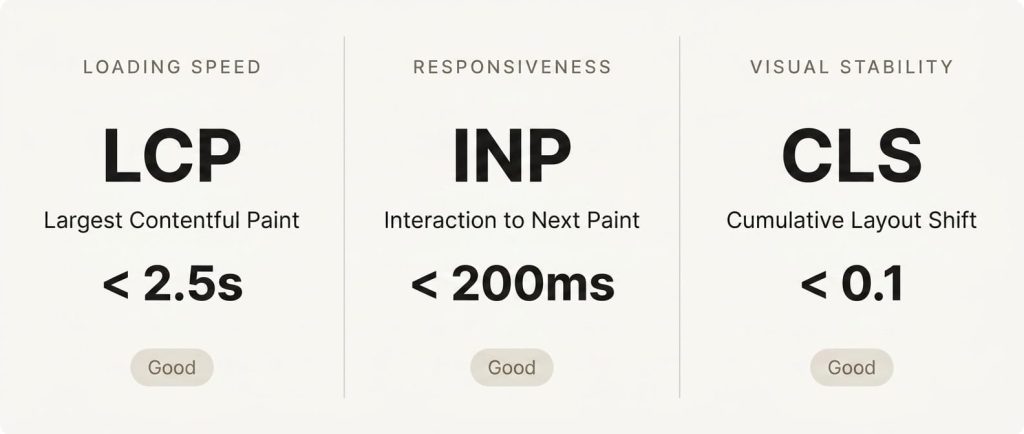
Core Web Vitals — LCP, INP, CLS against Google’s thresholds, mostly driven by image weight and third-party scripts.
Schema coverage — Product, Breadcrumb, FAQ, Organization, Article. Most themes ship with Product only.
These issues rarely announce themselves in the admin — they quietly cap your rankings until someone runs a proper audit. The full walkthrough — speed fixes, canonical verification, robots.txt.liquid customization, and schema templates — is covered in our dedicated guide to technical SEO for Shopify.
How Does Blogging Drive Traffic to a Shopify Store?
Product and collection pages can only rank for transactional and commercial queries. Everything informational — “how to,” “what is,” “vs.” — belongs on the blog, and every blog post should route readers toward a product or collection page.
What makes the blog work for ecommerce:
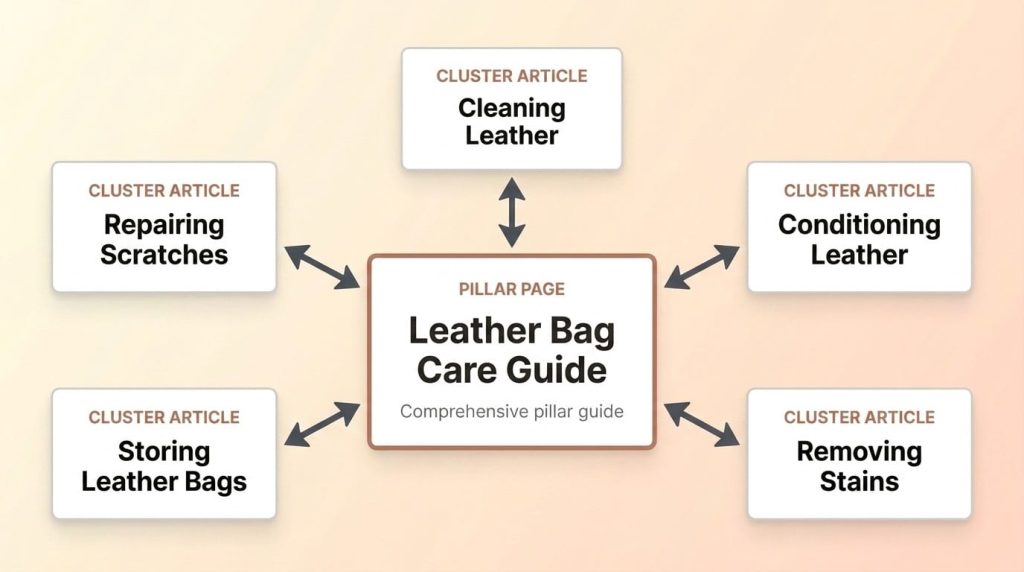
Topic clusters — pillar pages on broad subjects, supported by cluster articles that link back.
Blog-to-product linking — every post earns its keep by bridging informational traffic to a product page.
E-E-A-T signals — real expertise and firsthand experience, not generic “ultimate guide” filler.
Done well, the blog becomes a traffic engine that feeds your product pages month after month and builds the kind of topical authority Google recognizes. The full playbook — editorial calendar, cluster architecture, linking strategy, and AI search considerations — is in our dedicated guide to Shopify blog SEO.
How Do You Build Backlinks for a Shopify Store?
Backlinks remain one of Google’s top ranking factors. A link from another website to your Shopify store is a vote of confidence, and more high-quality votes mean more authority. Without off-page SEO, even perfectly optimized product pages will struggle to outrank competitors with stronger link profiles.
Why Backlinks Matter for Ecommerce
For ecommerce stores, backlinks are harder to earn than for content-focused sites. People naturally link to helpful articles, research, and tools, but rarely link to product pages. That’s exactly why a content strategy is essential: it creates linkable assets that build authority across your entire domain.
Digital PR and Brand Mentions
Digital PR is one of the most effective link-building strategies for Shopify stores. The goal is to get your brand, products, or expertise mentioned in online publications and media outlets.
Actionable digital PR tactics:
Submit your products to “best of” roundup posts in your niche (e.g., “Best Leather Bags for Travel”).
Offer expert commentary to journalists covering your industry. Use platforms like HARO (Help a Reporter Out) or Connectively.
Create original research or data related to your niche that journalists will reference and link to.
Launch a unique product, charitable initiative, or brand story that earns organic media coverage.
Even unlinked brand mentions help SEO by reinforcing your brand’s entity in Google’s knowledge graph. Over time, consistent brand mentions build the authority signals Google uses to rank established brands.
Guest Content and Industry Partnerships
Guest content means publishing articles on other websites in exchange for a link back to your store. This works when the content is genuinely valuable and the hosting site is relevant to your industry.
Find industry blogs, online magazines, and niche publications that accept guest contributions.
Pitch topics relevant to their audience that let you naturally reference your expertise or products.
Focus on quality over quantity. One link from a respected industry site is worth more than fifty links from low-quality directories.
Partnerships with complementary brands also create linking opportunities. A leather care brand and a leather bag brand, for example, could create co-branded content and link to each other’s stores.
Using Existing Relationships for Links
Most Shopify store owners already have link-building opportunities they’re not using:
Suppliers and manufacturers: Ask to be listed on their “Where to Buy” or “Authorized Retailers” page.
Industry associations: Join relevant trade associations that maintain member directories with links.
Local business directories: If you have a physical presence, claim your listing on local directories and your local chamber of commerce.
Influencer partnerships: When you send products to influencers, ask for a link in their blog post, not just a social media mention.
Customer testimonials: Offer to provide testimonials for tools and services you use. Many companies feature customer quotes with a link back to the customer’s website.
Start with the low-hanging fruit. Reach out to existing partners and relationships before pursuing cold outreach. Warm connections are far more likely to result in quality links.
How Do You Optimize a Shopify Store for AI Search?
AI-powered search is changing how consumers find and evaluate products. Google AI Overviews, ChatGPT with web search, and Perplexity synthesize info from multiple sources into direct answers. Shopify stores that optimize for AI search today gain a significant edge as these platforms grow.
How AI Search Is Changing Ecommerce Visibility
Traditional search sends users to a list of blue links. AI search provides answers directly, citing sources along the way. For ecommerce, this means:
AI Overviews in Google appear above traditional search results for many product-related queries.
ChatGPT and Perplexity users ask product recommendation questions and get curated answers with source links.
Being cited in an AI response can drive significant traffic. But it requires your content to be structured so AI systems can easily parse and reference it.
The stores most likely to be cited by AI systems are those with clear, well-structured content, strong E-E-A-T signals, and consistent brand info across the web.
Answer-First Formatting for AI Citation
AI systems prefer content that leads with direct answers before providing supporting details. This is the same “answer-first” pattern that works well for featured snippets.
To optimize for AI citation:
Start every major section with a short summary paragraph (40 to 60 words) that directly answers the question the heading implies.
Use clear heading structures (H2, H3) that frame questions and topics explicitly.
Provide specific data points, statistics, and factual claims that AI systems can extract and attribute.
Write in a declarative, factual tone rather than vague marketing language.
For example, instead of writing “our leather bags are really great quality,” write “full-grain leather bags last 10 to 20 years with proper care because the grain layer is left intact during tanning, preserving the hide’s natural strength and durability.”
Entity Consistency Across Your Brand
AI systems build an understanding of brands as “entities” by combining info across the web. The more consistent your brand info, the more likely AI systems are to trust and cite it.
Make sure consistency exists across:
Your Shopify store’s About page, including a clear description of your brand, founding story, and expertise.
Google Business Profile (if you have a physical location).
Social media profiles (same name, same description, same branding).
Industry directories and review platforms.
Your Google Merchant Center product data.
Use Organization schema on your homepage to formally declare your brand entity, including your name, logo, founding date, and social media URLs. This gives AI systems structured data to work with.
FAQ Schema and Structured Q&A for AI Extraction
FAQ content helps AI systems extract direct answers from your pages. Worth knowing up front: Google restricted FAQPage rich results to authoritative government and health sites in August 2023, so the star-and-arrow FAQ treatment in traditional search results is no longer available for most ecommerce stores. The schema itself isn’t penalized, and the underlying Q&A content still helps AI Overviews, ChatGPT, and Perplexity parse and cite your answers.
To maximize AI extraction:
Add FAQ sections to product pages, collection pages, and key landing pages.
Apply FAQPage schema to key pages with question-and-answer content. It still helps AI parsing even without rich snippets, but there’s no need to blanket-deploy it across the entire catalog.
Write short answers (40 to 80 words) that stand alone as useful responses.
Use natural question phrasing in your FAQ headings that mirrors how people ask AI assistants.
For example, a product page for a leather messenger bag might include FAQs like “What laptop size fits this bag?” or “Is this bag suitable for air travel carry-on?” These are exactly the types of questions users ask AI assistants when researching products.
How Do You Measure Shopify SEO Performance?
SEO without measurement is guesswork. Most Shopify stores either track nothing or track the wrong things. With ecommerce SEO delivering an average 3.2x ROI and an 8-to-9-month break-even window according to First Page Sage’s 2025 benchmark study of 80 ecommerce clients, knowing what to measure and how to read the data separates growing stores from stagnant ones.
Key Metrics to Track
Focus on these four primary metrics:
Organic traffic: The number of visitors arriving from unpaid search results. Track this in GA4 under Acquisition > Traffic Acquisition, filtered by “Organic Search.” Month-over-month and year-over-year trends matter more than absolute numbers.
Keyword rankings: Which keywords your store ranks for and in what positions. Track your top 20 to 50 target keywords using a rank tracking tool like Ahrefs, Semrush, or SE Ranking.
Organic revenue: The revenue directly attributed to organic search traffic. Set this up in GA4 using ecommerce tracking. This is the metric that proves SEO ROI to stakeholders.
Organic conversion rate: What percentage of organic visitors make a purchase. Compare this to other channels to understand organic traffic quality.
Secondary metrics to monitor include impressions in Google Search Console, click-through rate from search results, average position changes, and the number of indexed pages.
Using Google Search Console Effectively
Google Search Console is the most underused tool in most Shopify merchants’ toolkits. Beyond the initial setup, use GSC actively to:
Find quick wins: Filter the performance report by queries where your average position is 5 to 15. These are keywords where you’re close to page one, and a small improvement could drive significant new traffic.
Spot content gaps: Look at queries with high impressions but low CTR. These are keywords Google thinks you’re relevant for, but your title tag or meta description isn’t compelling enough to earn clicks.
Monitor indexing: Check the Pages report regularly. Fix any pages showing “Excluded” or “Error” status that should be indexed.
Detect traffic drops: Compare date ranges in the Performance report. Cross-reference with Google algorithm update timelines to understand causes.
Setting Up GA4 for Ecommerce SEO Tracking
GA4’s ecommerce tracking lets you attribute revenue to specific channels, including organic search. To get the most from GA4 for SEO:
Enable enhanced ecommerce events: view_item, add_to_cart, begin_checkout, and purchase.
Create a custom exploration report filtered by “Organic Search” traffic to see the customer journey from landing page to purchase.
Set up landing page reporting to find which organic landing pages drive the most revenue.
Build a custom dashboard combining organic traffic, organic conversions, and organic revenue in one view.
Knowing which landing pages generate the most organic revenue tells you exactly where to double down. If a blog post about leather care is driving product purchases, create more content in that cluster.
How to Know If Your SEO Is Working
SEO results take time. Expect 3 to 6 months for meaningful ranking improvements on a new site, and 1 to 3 months for changes on an established store. Here’s how to tell if your efforts are moving in the right direction:
Positive signals: Increasing impressions in GSC (even before clicks increase), rising average positions for target keywords, growing organic traffic, and increasing organic revenue.
Neutral signals: Stable metrics during algorithm updates, seasonal fluctuations, or right after major site changes.
Warning signals: Declining impressions, losing rankings for keywords you previously held, decreasing organic traffic over more than two straight months.
Don’t make reactive decisions based on one bad week. SEO metrics fluctuate daily. Look at 30-day and 90-day trends to make informed decisions. For help spotting issues across your store, see our Shopify homepage checklist.
Common Shopify SEO Mistakes to Avoid
A handful of the same mistakes show up on Shopify store after Shopify store. Fixing them puts you ahead of most of your competitors, because they haven’t.
Ignoring URL handles. Shopify auto-generates URL slugs from your product titles, often creating long, keyword-stuffed URLs. Always customize the URL handle before publishing. A URL like /products/bag is better than /products/the-amazing-hand-crafted-vintage-leather-messenger-bag-for-men-and-women-brown.
Using duplicate product descriptions. Copying the manufacturer’s product description is one of the most damaging SEO mistakes. Hundreds of other retailers use that same text. Write unique descriptions for every product, even if you start with your top sellers and work down.
Missing alt text on images. It’s common to find stores with hundreds of product images and no alt text on any of them. Every image needs descriptive alt text — it’s free SEO value and also an accessibility requirement.
App bloat slowing site speed. The average Shopify store installs 6 to 8 apps, and many load JavaScript on every page whether needed or not. Audit your apps quarterly. Remove anything you’re not actively using. Test your site speed before and after removing apps to measure the impact.
Not writing collection page descriptions. Empty collection pages rank much worse than collections with unique, keyword-rich descriptions. Even 100 to 200 words of descriptive content above or below the product grid makes a difference.
Thin product pages with no content below the fold. A product page with only a title, price, and “Add to Cart” button gives Google almost nothing to index. Add detailed descriptions, specifications, FAQs, and reviews to give every product page depth.
Ignoring the blog entirely. Many Shopify merchants view the blog as irrelevant for ecommerce. In reality, it’s the single best tool for capturing informational traffic, building topical authority, and creating internal linking opportunities that strengthen your entire site.
Key Stat: According to HubSpot, companies that blog get 55% more website visitors than businesses that don’t. If you’re not blogging, you’re giving that traffic to competitors who are.
Frequently Asked Questions
Is Shopify good for SEO?
Yes. Shopify handles about 80% of technical SEO automatically, including canonical tags, SSL, XML sitemaps, mobile-responsive themes, and CDN hosting. The rest of the work, like writing meta tags, creating content, and building backlinks, depends on you. Shopify provides a strong SEO foundation that competes with any major ecommerce platform.
How long does Shopify SEO take to show results?
Expect 3 to 6 months for meaningful ranking improvements on a new store, and 1 to 3 months on an established store with existing authority. SEO is a compounding investment. Early efforts may show slow progress, but results speed up over time as your store builds topical authority and earns backlinks. Track progress monthly using Google Search Console and GA4.
Do I need a Shopify SEO app?
Not always. Most basic Shopify SEO work can be done through the Shopify admin without extra apps. However, apps can help with specific tasks like JSON-LD schema markup, image compression, and redirect management. Avoid apps that promise to “automate” your entire SEO strategy. No app replaces the need for quality content and strategic optimization.
What is the best Shopify SEO app?
There’s no single best SEO app because different stores have different needs. For schema markup, apps like JSON-LD for SEO or Smart SEO are effective. For image compression, TinyIMG and Crush.pics work well. For redirects, Easy Redirects handles bulk URL management. Choose apps that solve specific problems rather than all-in-one solutions that add bloat.
How much does Shopify SEO cost?
Costs vary widely. DIY Shopify SEO is free beyond your time investment. Freelance SEO specialists typically charge $1,000 to $2,000 per month. Agency-level Shopify SEO services range from $2,000 to $10,000+ per month depending on scope, competition, and store size. The right investment depends on your revenue goals and competitive landscape.
Can I do Shopify SEO myself?
Yes. Many successful Shopify stores are optimized by their owners. The basics like writing title tags, adding alt text, creating content, and fixing URL handles don’t need technical expertise. More complex work like schema markup, site speed optimization, and large-scale content strategy may benefit from professional help if you lack experience.
What is the difference between Shopify SEO and regular SEO?
The core principles are identical: keyword research, on-page optimization, technical SEO, content, and link building. The differences are platform-specific. Shopify has its own URL structure (forced /products/ and /collections/ prefixes), auto-generated sitemaps and robots.txt, Liquid-based theme templates, and platform-specific duplicate content patterns. Understanding these Shopify-specific details is what separates effective Shopify SEO from generic advice.
Taking Action on Your Shopify SEO
Shopify SEO isn’t a launch-day task. It’s ongoing work — content, links, technical hygiene, measurement — and the compounding effect is what separates stores that grow from stores that plateau.
We’re an Atlanta-based Shopify agency helping growing merchants across the US with custom design, complex migrations, and conversion rate optimization. Book a free discovery call to discuss your goals, walk through clear timelines and pricing, and see how we can elevate your site, no commitment required.