
Both platforms can rank well in Google. The right choice depends on your business model, not the CMS itself. For ecommerce-first businesses, Shopify’s built-in SEO handles most technical requirements automatically. For content-heavy sites that also sell products, WordPress with WooCommerce offers more control over every SEO detail. Both platforms can compete for the same keywords when the optimization work gets done.
Is Shopify or WordPress Better for SEO?
Neither platform has an inherent SEO advantage. Google doesn’t favor one CMS over another. What matters is how well you optimize your content, technical setup, and user experience. That said, each platform makes certain SEO tasks easier or harder, and those differences add up over time.
The biggest difference between the two platforms is not capability; it is how much work falls on you. Shopify automates most technical SEO out of the box. WordPress gives you the tools to do everything, but you have to install, configure, and maintain them.
Think of it this way: Shopify is an automatic car. WordPress is a manual. Both get you to the same destination. The question is whether you want control or convenience.
The rest of this comparison breaks down the specific differences that matter for rankings: technical SEO, URL structure, content management, plugins, structured data, and page speed. If you’re choosing between Shopify and WordPress for a new store, or thinking about migrating, this guide covers what you actually need to know.
How Do Shopify and WordPress Handle Technical SEO?
Shopify wins on technical SEO defaults. Most of the foundational requirements, like SSL, sitemaps, canonical tags, and mobile responsiveness, are handled automatically from day one. WordPress can match every single one of these features, but you’ll need plugins, hosting configuration, and ongoing maintenance to get there.
Here’s how the two platforms compare across the technical SEO features that matter most for rankings.
| SEO Feature | Shopify | WordPress |
|---|---|---|
| SSL/HTTPS | Included free on all plans | Depends on hosting (most include it now) |
| XML Sitemap | Auto-generated, updates automatically | Requires Yoast SEO or RankMath plugin |
| Canonical Tags | Automatic on all pages | Requires SEO plugin configuration |
| robots.txt | Auto-generated, limited customization via Liquid | Full control via direct file editing |
| CDN | Built-in Shopify CDN | Requires Cloudflare or hosting-level CDN |
| Mobile Responsive | All official themes are responsive | Theme-dependent, varies widely |
| Page Speed | Generally fast (managed hosting) | Varies wildly based on hosting, plugins, and theme |
| Core Web Vitals | Good baseline from managed infrastructure | Requires active optimization effort |
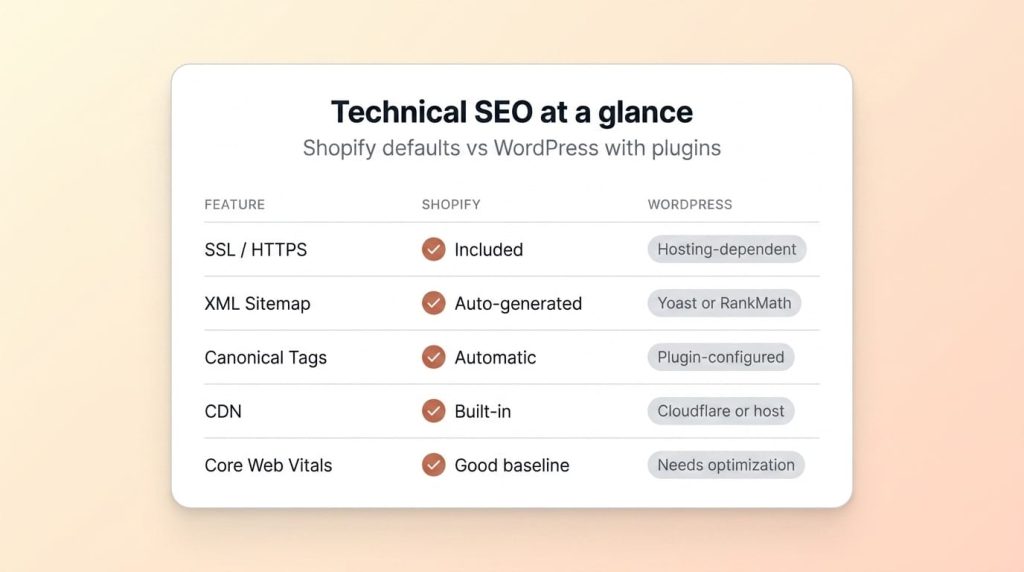
The practical takeaway: If you don’t have a developer or technical team, Shopify’s defaults keep you out of trouble. WordPress gives experienced teams more flexibility, but that flexibility comes with responsibility. A misconfigured WordPress plugin can break your sitemap, duplicate your canonical tags, or block Google from crawling critical pages.
For a deeper look at Shopify’s technical setup, see our technical SEO for Shopify guide.
How Does URL Structure Compare?
WordPress gives you complete control over URL structure. Shopify doesn’t. That’s the key difference, and it’s the one that generates the most debate in the WordPress vs Shopify SEO conversation. But the real-world impact is smaller than most articles suggest.
Shopify forces URL prefixes for different content types. Product pages always live at /products/product-name. Collection pages use /collections/collection-name. Blog posts sit under /blogs/blog-name/post-title. You can’t change these prefixes.
WordPress lets you set any permalink structure you want. You can use /product-name/, /shop/product-name/, /category/product-name/, or any custom pattern. Most WooCommerce stores use /product/product-name/ by default, which is similar to Shopify’s approach anyway.
The Shopify Collection URL Issue
Shopify creates a potential duplicate content problem with collection-filtered product URLs. When a customer clicks a product from a collection page, the URL becomes /collections/collection-name/products/product-name instead of just /products/product-name. Both URLs show the same product page.
Shopify handles this with canonical tags that point back to the clean /products/ URL. Google follows these canonicals correctly in most cases. But if you’re building internal links, always use the clean product URL, not the collection-filtered version.
WordPress URL Bloat
WordPress has its own URL problem: category and tag pages. By default, WordPress creates indexable archive pages for every category and every tag. A store with 50 product categories and 100 tags suddenly has 150 extra pages that often contain thin or duplicate content.
Most WordPress SEO plugins let you noindex these archives. But many store owners don’t realize they need to, and Google crawls and indexes them anyway.
The URL structure difference looks significant on paper, but in practice, a Shopify store doesn’t fail to rank because of its /products/ prefix. Google handles prefixed URLs just fine. What hurts rankings is thin content on those URLs, not the URL pattern itself.
Which Platform Has Better Content Management for SEO?
WordPress is the clear winner for content management. If content marketing is a core part of your growth strategy, WordPress gives you tools that Shopify simply can’t match. That doesn’t mean Shopify’s content features are bad. They’re just limited compared to what WordPress offers.
Shopify’s blog functionality covers the basics. You can create posts, assign authors, add tags, set meta titles and descriptions, and upload featured images. That’s enough for a store that publishes a few posts per month to support product pages.
But Shopify’s blog lacks features that content-heavy sites need. There are no custom post types, no native table of contents, no content categories (only tags), no built-in related posts, and limited content scheduling options. If your SEO strategy depends on publishing 20+ posts per month with complex internal linking, Shopify’s blog will feel restrictive.
WordPress was built for content. Custom post types let you create separate content structures for guides, case studies, glossary entries, and comparison pages. The block editor gives you layout control without custom code. Advanced taxonomy systems let you organize content with both categories and tags across multiple hierarchies.
For a pure ecommerce store where the blog is a secondary traffic channel, Shopify’s content tools are adequate. For businesses where organic content drives the majority of traffic and revenue, WordPress has a clear edge. Our Shopify SEO guide covers how to get the most out of Shopify’s content features despite these limitations.
How Do Plugins and Apps Affect SEO?
WordPress has deeper SEO plugin options. Shopify has fewer apps but also fewer ways to break your site. Both platforms offer tools to manage on-page SEO, but the depth and complexity differ significantly.
WordPress SEO plugins like Yoast SEO, RankMath, and All in One SEO give you granular control over almost every SEO element. Focus keyword tracking, content readability analysis, schema markup, redirect management, breadcrumb configuration, XML sitemap customization, and social media meta tags are all built into a single plugin.
Shopify’s SEO app ecosystem is smaller. Apps like JSON-LD for SEO, Smart SEO, and SEO Manager handle specific tasks like schema markup, image alt text automation, and bulk meta tag editing. They work well for what they do, but they don’t offer the same all-in-one depth as WordPress plugins.
Here’s where it gets interesting: the WordPress plugin advantage is also its biggest weakness.
Warning: The biggest SEO problem on WordPress sites isn’t a lack of features. It’s plugin bloat. Stores with 30+ plugins often have terrible Core Web Vitals because each plugin adds JavaScript, CSS, and database queries. Every plugin is a potential conflict, a potential security hole, and a potential speed bottleneck.
Shopify stores typically run with 5-15 apps. WordPress sites often run 20-40 plugins. The more plugins you add, the more maintenance you need: updates, compatibility checks, and performance monitoring. A WordPress site with three conflicting SEO plugins can have worse technical SEO than a stock Shopify store with zero apps installed.
If you have a development team that manages plugins carefully, WordPress gives you more power. If you’re a small team without dedicated technical resources, Shopify’s simpler app ecosystem is safer.
How Does Structured Data Compare?
Shopify provides basic product schema out of the box. WordPress offers more flexibility for complex schema types but requires manual configuration. Both approaches work for getting rich results in Google, but the effort involved is different.
Most Shopify themes include Product structured data automatically. When you fill in your product title, price, description, images, and availability, Shopify outputs the corresponding JSON-LD markup. This means your product pages can show star ratings, prices, and availability directly in search results without installing any apps.
Adding other schema types on Shopify, like FAQ, HowTo, Breadcrumb, or Organization markup, requires either Liquid template editing or a dedicated app. It’s doable, but it’s not as simple as the built-in product schema.
WordPress gives you full schema control through plugins like Yoast SEO, Schema Pro, or RankMath’s built-in schema module. You can add any Schema.org type to any page, customize the markup per post type, and create conditional schema rules. For sites that need Article, FAQ, HowTo, LocalBusiness, and Product schema across different page types, WordPress plugins make this manageable.
Pages with rich results get significantly higher click-through rates because the listing takes up more visual space and surfaces specifics like price and rating right in the SERP. That makes structured data worth the implementation effort on either platform.
The practical difference: Shopify gets product schema right automatically. WordPress lets you implement anything, but nothing is automatic. If your site primarily sells products, Shopify’s default schema is a strong starting point. If you need complex, multi-type schema across a content-heavy site, WordPress gives you the tools to build it.
What About Page Speed and Hosting?
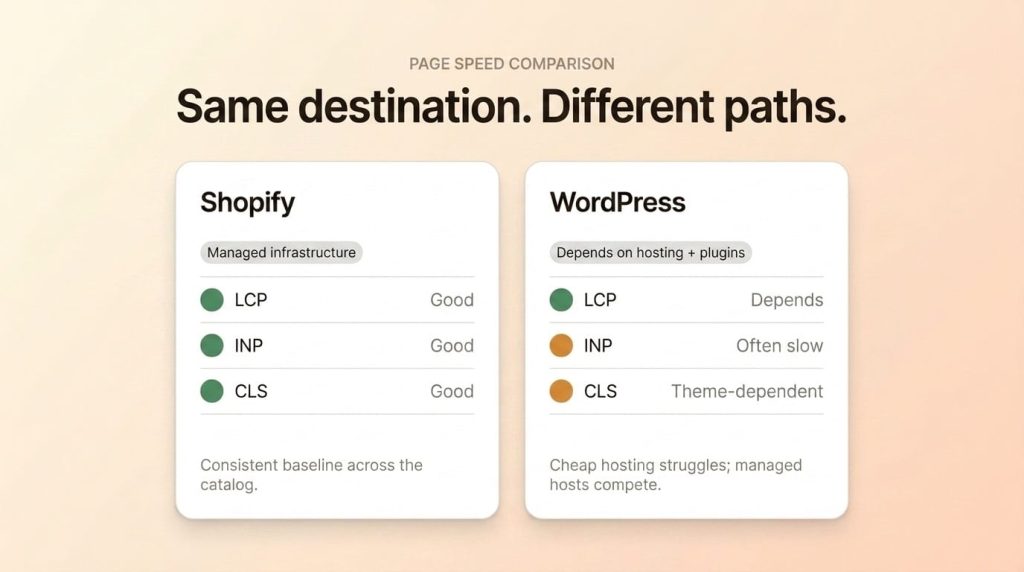
Shopify is faster out of the box because it controls the entire hosting stack. WordPress speed varies wildly depending on your hosting provider, theme, and plugin count. Both platforms can achieve excellent Core Web Vitals scores, but the path to get there is very different.
Shopify runs on managed infrastructure with a built-in CDN, automatic image optimization, and server-side caching. Most Shopify stores load in 1-3 seconds with minimal effort. You don’t configure servers, manage caching layers, or worry about database optimization. Shopify handles all of it.
WordPress hosting ranges from $3/month shared hosting to $100+/month managed platforms like WP Engine, Kinsta, or Cloudways. The hosting tier you choose directly impacts your page speed, server response time, and ability to handle traffic spikes. A WordPress site on cheap shared hosting will struggle with Core Web Vitals. The same site on managed hosting with a lean theme can outperform Shopify.
Google’s research found that 53% of mobile visitors leave a page if it takes longer than 3 seconds to load. Speed isn’t just an SEO ranking factor. It directly affects bounce rates and revenue.
Pro Tip: If you’re on WordPress and your Core Web Vitals are failing, the fix is usually hosting, not plugins. Move to managed WordPress hosting before adding caching plugins. A better server does more for speed than any optimization plugin can.
One area where WordPress can beat Shopify is image optimization. WordPress plugins like ShortPixel and Imagify give you fine-grained control over compression levels, format conversion (WebP, AVIF), and lazy loading. Shopify’s built-in image handling is good but less customizable.
For most store owners, Shopify’s speed advantage comes down to simplicity. You don’t need to think about it. WordPress can match or beat Shopify’s speed, but it takes ongoing effort and the right hosting investment.
When Should You Choose Shopify vs WordPress?
The best platform for SEO is the one that fits your business model. SEO capability shouldn’t be the deciding factor because both platforms can rank. Instead, choose based on how you operate, what you sell, and what resources you have available.
Choose Shopify If:
- Your primary business is selling physical products online.
- You want managed hosting and minimal technical maintenance.
- You don’t have a developer on staff or on retainer.
- You need POS or omnichannel retail integration.
- You want to launch quickly without configuring hosting, security, and updates.
- Your content strategy is secondary to your product catalog.
Choose WordPress If:
- Content marketing is a core growth strategy, not just a blog sidebar.
- You need complex site architecture beyond products and collections.
- You have developer resources to manage updates, hosting, and security.
- You sell digital products, courses, or memberships (WordPress plugins excel here).
- You need deep customization of every SEO element.
- You’re building a media site or content hub that also sells products.
Pro Tip: Don’t choose a platform based on what SEO features it has today. Choose based on your team’s ability to maintain and optimize the site over the next 2-3 years. A well-maintained Shopify store will always outrank a neglected WordPress site.
Already on WordPress and considering Shopify? See our WordPress to Shopify migration guide for a step-by-step process. Worried about losing rankings during the switch? Read how to migrate from WooCommerce to Shopify without losing SEO rankings.
Frequently Asked Questions
Is Shopify good for SEO?
Yes. Shopify handles most technical SEO automatically, including SSL, sitemaps, canonical tags, and mobile responsiveness. The remaining 20% you control manually, like meta tags, content quality, alt text, and internal links, determines your ranking success. Many Shopify stores rank on page one of Google across competitive ecommerce keywords.
Is WordPress better than Shopify for SEO?
WordPress offers more granular control, especially for content-heavy sites. But more control also means more responsibility. Many WordPress sites have worse SEO than Shopify stores because owners don’t maintain plugins, speed, and security. If you have the technical resources to manage WordPress properly, it gives you more flexibility. If you don’t, Shopify’s automated approach often produces better results.
Can you do SEO on Shopify without apps?
Yes. Title tags, meta descriptions, alt text, URL handles, heading structure, blog content, and internal links are all managed natively in the Shopify admin. You don’t need apps for on-page SEO fundamentals. Apps help with extras like advanced schema markup, automated image compression, and bulk redirect management.
Does Google prefer WordPress or Shopify?
Google doesn’t prefer any CMS. Google ranks pages based on content quality, relevance, authority, and technical health. Both Shopify and WordPress can achieve all four. Google’s own documentation states that the CMS you use doesn’t affect your ability to rank. What matters is how well you execute SEO on whatever platform you choose.
Should I migrate from WordPress to Shopify for better SEO?
Don’t migrate for SEO alone. Migrate if Shopify better fits your business model, ecommerce needs, or operational simplicity. SEO rankings can transfer through proper redirect mapping during migration. If your WordPress site has strong rankings, migrating just for SEO gains doesn’t make sense. If your business needs align better with Shopify, SEO shouldn’t be the reason you stay on WordPress.
Final Thoughts
Both Shopify and WordPress rank well when optimized properly. Shopify makes technical SEO easier by automating the fundamentals. WordPress gives you more control but requires ongoing maintenance and technical knowledge. The decision should be based on your business model, team resources, and growth strategy, not SEO alone.
For a complete Shopify-side strategy, see our definitive guide, and the 30-step checklist tracks execution. If you’d rather have the work done, our Shopify SEO services handle optimization end-to-end.