
Product pages are where Shopify SEO directly turns into revenue. These pages target transactional keywords, the searches people make when they’re ready to buy. 87% of consumers say product descriptions are the most important factor when deciding to purchase online. Yet most Shopify stores leave product pages with thin descriptions, auto-generated titles, and zero schema markup.
This guide is part of our Shopify SEO guide.
Why Do Shopify Product Pages Need SEO?
Product pages are the only pages on your store that generate revenue directly from organic search. A shopper searching “vintage leather messenger bag” is ready to buy — if your page ranks, that click converts. Most stores treat product pages as listing cards: a title, a few manufacturer-copied bullets, stock photos. That’s indistinguishable from hundreds of competitors selling the same SKU. The four levers that fix it are titles, descriptions, schema, and reviews.
How Do You Optimize Shopify Product Titles for SEO?
Product titles are the single most important on-page element for Shopify product page SEO. Your title appears in Google search results, browser tabs, social media shares, and internal site search. A well-written title improves both rankings and click-through rate.
Many store owners write product titles for branding instead of search. Creative names like “The Wanderer” or “Midnight Collection Piece #7” mean nothing to Google. Descriptive, keyword-rich titles tell both Google and shoppers exactly what the product is.
Product Title Best Practices
Keep titles under 60 characters. Google truncates anything longer in search results, which hurts both readability and click-through rate. Front-load the primary keyword. Include the product type, one key attribute, and brand name if space allows.
Avoid stuffing multiple keywords into a single title. “Leather Bag Men Messenger Bag Vintage Bag Brown Crossbody” reads like spam to both Google and customers. Write naturally. One clear, descriptive title beats a keyword-stuffed mess every time.

Before and After: Product Titles
Before: “The Amazing Hand-Crafted Bag”
After: “Vintage Leather Messenger Bag – Brown, Full-Grain”
The “after” title includes the product type (messenger bag), the material (leather, full-grain), the style (vintage), and the color (brown). Someone searching for any combination of those terms can find this product. The “before” title tells Google almost nothing useful.
How Do You Write Product Descriptions That Rank?
Despite how much product descriptions influence purchase decisions, most Shopify stores copy manufacturer copy word for word. That creates duplicate content across hundreds of competing stores selling the same products, and it gives Google zero reason to rank your page over anyone else’s.
The rule is simple: every description must be unique. If you’re selling a product that 50 other stores also carry, the description is your only chance to stand out in organic search. Manufacturer copy is the baseline. You need to go beyond it.
Description Structure That Works
Write at least 300 words per product description. For high-competition products, aim for 500 or more. Structure each description in three parts:
- Keyword-rich opening paragraph (50-80 words): Describe the product using your target keyword naturally. Answer the core question: what is this product, and who is it for?
- Feature-benefit bullet points (5-8 bullets): Pair every feature with a benefit. “Full-grain leather” is a feature. “Develops a unique patina over years of daily use” is the benefit.
- Detailed specs below the fold: Dimensions, weight, materials, care instructions, compatibility details. This content satisfies both long-tail searches and comparison shoppers.
Use natural keyword placement throughout the description. If your target keyword is “vintage leather messenger bag,” work it into the opening paragraph and one subheading. Don’t force it into every sentence. Google’s algorithms are sophisticated enough to understand context, synonyms, and related terms.

Before and After: Product Descriptions
Before (thin description):
“Beautiful handmade leather bag. Available in brown and black. Free shipping.”
After (optimized description):
“This vintage leather messenger bag is built for professionals who carry a laptop, notebook, and daily essentials without sacrificing style. Hand-stitched from full-grain cowhide leather, it develops a rich patina that makes each bag unique over time.
- Full-grain cowhide leather: Naturally weather-resistant, develops character with age
- Padded 15-inch laptop compartment: Fits MacBook Pro, Dell XPS, and similar-sized laptops
- Adjustable shoulder strap: 42-54 inch range with brass buckle hardware
- Interior organization: Two slip pockets, one zippered pocket, pen loops
- Dimensions: 16 x 12 x 4 inches, weighs 2.8 lbs
Each bag is handmade in our workshop using traditional saddle-stitching techniques. We use waxed thread for durability, meaning the stitching won’t unravel even if a single thread breaks.”
The “before” description is 11 words of useful content. The “after” description answers customer questions, targets long-tail searches, and provides the detail that converts browsers into buyers.
For conversion-focused optimization beyond SEO, see our guide on product page optimization that converts.
How Should You Handle Shopify URL Handles?
Shopify auto-generates URL handles from product titles, usually producing long slugs padded with stop words. Always customize the handle before publishing. A title like “The Amazing Hand-Crafted Premium Quality Leather Messenger Bag for Men” becomes /products/the-amazing-hand-crafted-premium-quality-leather-messenger-bag-for-men by default — too long, full of filler, and does nothing for SEO.
URL Handle Rules
Keep handles to 3-5 words. Include your primary keyword. Remove stop words like “the,” “for,” “and,” and “of.” Use hyphens to separate words.
Bad: /products/the-amazing-hand-crafted-premium-quality-leather-messenger-bag-for-men
Good: /products/vintage-leather-messenger-bag
The good URL is short, descriptive, keyword-rich, and easy to read. It also looks far better when shared on social media or in emails.
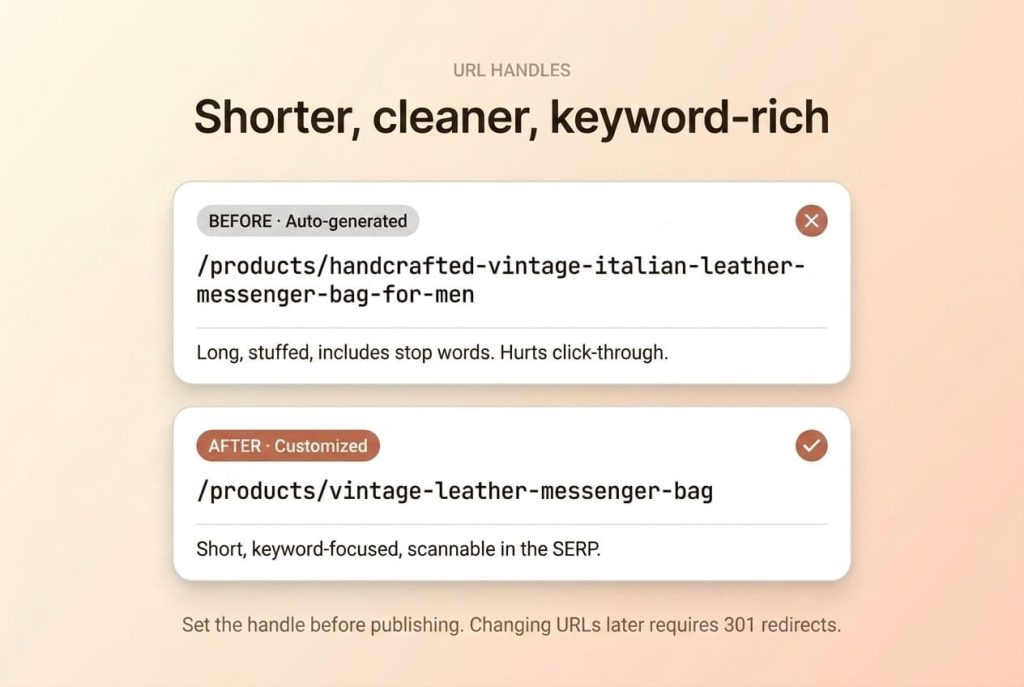
Warning: Changing a URL handle after Google has indexed the page creates a broken link. Shopify doesn’t auto-create redirects. You’ll need to add one manually under Online Store > Navigation > URL Redirects. Always set the correct handle before publishing a product, not after.
How Do You Optimize Product Images for Search?
Product images drive both Google Images traffic and on-page conversions. Optimized images load faster, appear in image search results, and provide accessibility for screen readers. Every image needs descriptive alt text and proper file naming before you upload it to Shopify.

Google can’t “see” your product photos. It relies on file names, alt text, and surrounding page content to understand what an image shows. An image named IMG_4521.jpg with empty alt text is invisible to search engines. That’s lost traffic from Google Images.
Image Optimization Checklist
Write unique alt text for every image. Don’t repeat the product name identically across all images. Describe what each specific image shows. “Vintage leather messenger bag front view showing brass buckle closure” is better than just “vintage leather messenger bag” on every photo.
Name files before uploading. Rename files on your computer before adding them to Shopify. Use descriptive, hyphenated file names: vintage-leather-messenger-bag-brown.jpg, not IMG_4521.jpg or product-photo-1.jpg.
Compress to under 200KB. Use WebP or JPEG format for product photos. Save PNG only when you need transparency (like logos on clear backgrounds). Shopify serves WebP automatically to supported browsers, but starting with a compressed file ensures fast loading everywhere.
Include 5-8 images per product. Show multiple angles, close-up details, the product in use (lifestyle shots), and size/scale reference photos. More images give Google more content to index and give customers more reasons to buy.
Pro Tip: Shopify lets you add alt text to images at the product level and at the theme level. The product-level alt text (set in the Media section) is what Google reads on product pages. Always fill in alt text at the product level, not just in the theme editor.
What Product Schema Should Your Shopify Store Include?
Pages with Product schema rich results see 82% higher click-through rates. Product schema tells Google the product name, price, availability, and review ratings in a machine-readable format. When Google understands this data, it can display rich results with stars, prices, and stock status directly in search listings.
What Product Schema Includes
Complete Product schema should contain these properties:
- name: The product title
- description: The product description
- image: URL of the primary product image
- offers.price: The current price
- offers.priceCurrency: Currency code (USD, GBP, EUR)
- offers.availability: In stock, out of stock, or preorder
- aggregateRating: Average review score and total review count
- sku: The product SKU
- gtin: The product barcode (UPC, EAN, ISBN)
- brand.name: The brand or manufacturer name
What Most Shopify Themes Provide
Modern Shopify themes typically include basic Product schema with name, price, and availability. That’s a start, but it’s not enough for rich results with star ratings. Most themes don’t output aggregateRating, GTIN, or brand schema by default.
You have three options to add the missing schema:
- Edit your theme’s Liquid code: Add JSON-LD structured data directly to your product template. This gives you full control but requires a developer.
- Install a schema app: Apps like JSON-LD for SEO or Smart SEO generate comprehensive Product schema automatically.
- Use your review app’s schema output: Most review apps (Judge.me, Stamped, Yotpo) can output aggregateRating schema alongside their widgets.

How to Verify Your Schema
Use the Google Rich Results Test to check any product page URL. The tool shows exactly what structured data Google can read and flags any errors or warnings. Run this test after making schema changes to confirm everything validates correctly.
For a comprehensive look at your store’s technical setup, see our technical SEO for Shopify guide.
How Do Customer Reviews Improve Product Page SEO?
Customer reviews feed product pages the one thing they’re usually missing: fresh, unique, keyword-rich content you didn’t have to write. Every new review is additional indexable text that helps Google understand the product better.
Customers naturally use the search terms other customers look for. When a buyer writes “fits my 15-inch MacBook perfectly” in a review, that’s organic long-tail keyword content. You couldn’t plan that targeting better if you tried. Over time, hundreds of reviews create a deep layer of user-generated content that covers search queries you’d never think to target manually.
The Schema Benefit of Reviews
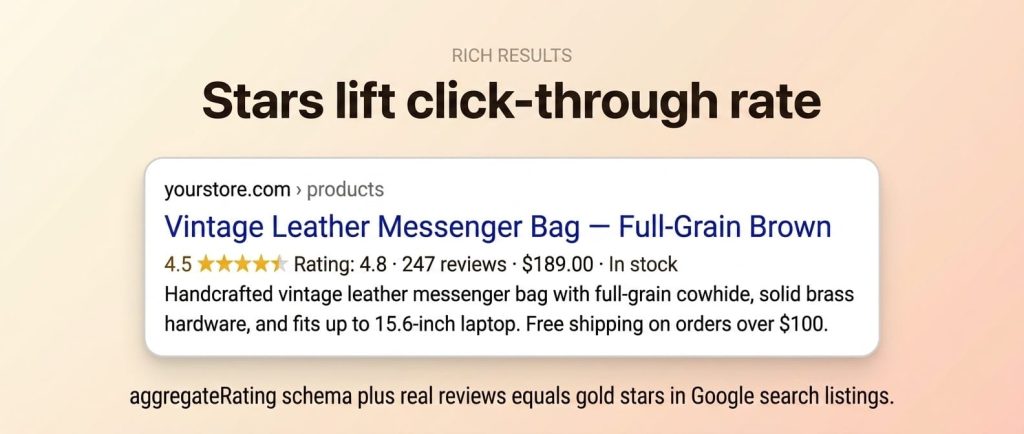
Reviews unlock star ratings in Google search listings. When your product page has aggregateRating schema and at least one review, Google can display yellow stars alongside your listing. Star ratings lift click-through rate by showing trust signals before the click.
Collecting Reviews Systematically
Don’t wait for customers to leave reviews voluntarily. Set up automated post-purchase email flows to request reviews 7-14 days after delivery. The most popular review apps for Shopify include Judge.me, Stamped, and Yotpo. All three integrate with Shopify’s order system and can automatically send review requests.
Reviews also hold attention on product pages. Shoppers who read reviews spend more time on the page and are less likely to hit the back button, which keeps qualified buyers in front of your offer longer.
For more on building effective product pages, see our guide on the 6 essentials every ecommerce product page needs.
What Meta Tags Does Every Product Page Need?
Meta titles and descriptions control what searchers see in Google results. Shopify auto-generates these from your product title and the first chunk of description text, but the defaults are almost always suboptimal. The auto-generated meta description often cuts off mid-sentence and includes formatting artifacts that look unprofessional in search results.
Custom meta tags are one of the fastest wins in Shopify product page optimization. You can update them in under a minute per product, and click-through rate shifts as soon as Google re-crawls the page.
Meta Title Rules
Keep meta titles between 50-60 characters. Front-load your primary keyword. Make each product’s meta title unique, even for similar products. Add a differentiator at the end if you have space, like the brand name or a key selling point.
Auto-generated: “The Amazing Hand-Crafted Bag – Your Store Name”
Optimized: “Vintage Leather Messenger Bag – Full-Grain Brown | YourBrand”
Meta Description Rules
Write meta descriptions between 150-160 characters. Include your primary keyword within the first 80 characters. Add a value proposition or call-to-action. Think of the meta description as a mini ad; it needs to convince someone to click your result over the nine other options on the page.
Auto-generated: “Beautiful handmade leather bag. Available in brown and black. Free shipping. Buy now at our store for the best prices on handmade goods and…”
Optimized: “Hand-stitched vintage leather messenger bag in full-grain brown cowhide. Fits 15-inch laptops. Free shipping and 30-day returns.”
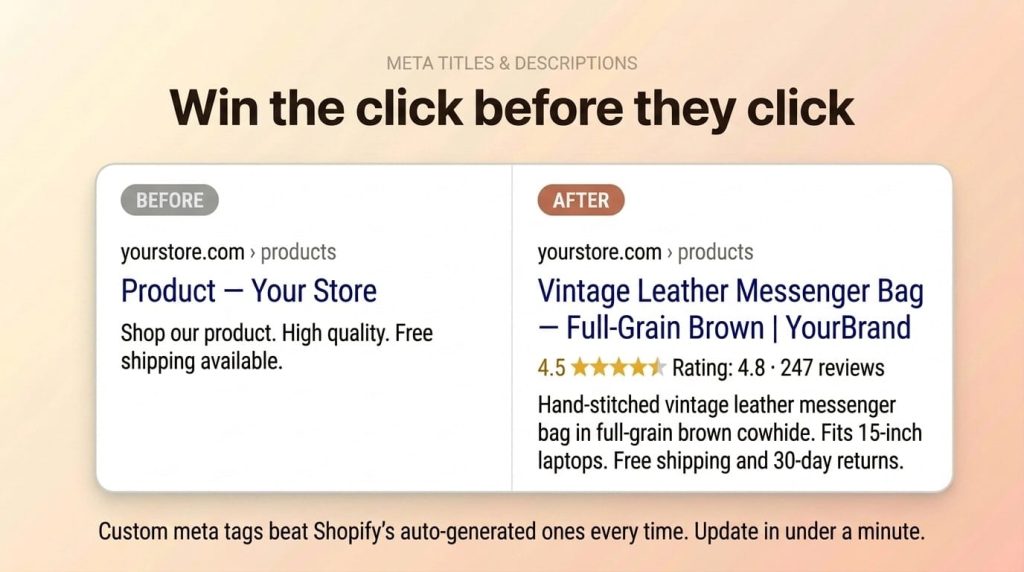
The optimized version includes the product type, key features, and purchase incentives, all within the character limit. The auto-generated version wastes space on generic filler and gets truncated.
Pro Tip: Shopify hides the meta fields by default. You need to scroll to the bottom of the product editor and click “Edit website SEO” (or “Edit SEO” in some themes) to access the meta title, meta description, and URL handle fields. Many store owners don’t realize these fields exist.
Putting It All Together: Product Page SEO Checklist
Here’s every optimization step in one place. Work through this list for each product page in your store. Start with your best-selling products and highest-traffic pages, then work down to the rest of the catalog.
| Element | Action | Admin Path |
|---|---|---|
| Product title | Under 60 chars, keyword front-loaded, descriptive | Products > [Product] > Title |
| Product description | 300+ words, unique content, structured format | Products > [Product] > Description |
| URL handle | 3-5 words, keyword-rich, no stop words | Search engine listing > URL handle |
| Meta title | 50-60 chars, unique, keyword first | Search engine listing > Page title |
| Meta description | 150-160 chars, value proposition, CTA | Search engine listing > Description |
| Image alt text | Unique per image, descriptive, includes product name | Media > click image > Alt text |
| Image file names | Descriptive, hyphenated, named before upload | Rename files locally before uploading |
| Product schema | Validate with Rich Results Test, add missing fields | Theme code or schema app |
| Customer reviews | Install review app, set up post-purchase emails | Review app settings |
For the full optimization workflow, use our Shopify SEO checklist to track progress across your entire store.
Frequently Asked Questions
How many words should a Shopify product description be?
Aim for 300 or more words per product. High-competition products may need 500 or more to outrank established competitors. The word count matters less than the quality of the content. Focus on unique descriptions that address customer questions, compare features, and explain benefits. Don’t pad descriptions with filler text just to hit a word count. Google values helpful, specific content over length alone.Does Shopify automatically add Product schema?
Most modern Shopify themes include basic Product schema with the product name, price, and availability status. However, many themes don’t include review ratings (aggregateRating), GTIN/barcode data, brand information, or SKU. You may need to add these fields manually through Liquid code edits or by installing a schema app like JSON-LD for SEO or Smart SEO. Always verify your schema using the Google Rich Results Test.Should I use the same meta description for similar products?
No. Every product page needs a unique meta description. Duplicate meta descriptions signal low-quality pages to Google and reduce your chances of ranking for product-specific terms. Even for products that differ only in color or size, write distinct meta descriptions that highlight the specific variant. If you have hundreds of similar products, prioritize writing unique descriptions for your top sellers first.How do I add alt text to Shopify product images?
Go to Products > [Product] > Media. Click any image in the media gallery, then add alt text in the sidebar panel that appears. Describe what the image shows, including the product name and key attributes visible in the photo. For example, “vintage leather messenger bag side view showing adjustable strap and brass buckle” is more helpful than just “messenger bag.” Repeat this for every image on the product page.What’s more important for product pages, SEO or conversion optimization?
Both work together, and you should optimize for both simultaneously. A product page that ranks on page one but doesn’t convert wastes every click. A high-converting page that doesn’t rank gets no organic visitors. SEO brings the traffic. Conversion optimization turns that traffic into revenue. The good news is that many SEO best practices, like detailed descriptions, quality images, and customer reviews, also improve conversion rates. They’re not competing priorities. They’re complementary.
Start Optimizing Your Product Pages Today
The highest-impact work is unique descriptions, custom titles and meta tags, complete schema, and a review system that generates fresh content and star ratings. Start with your best sellers and work down the catalog.
The full Shopify SEO strategy is in our definitive guide, and the 30-step checklist tracks execution. If you’d rather have the work done, our Shopify SEO services cover product-page optimization at scale.