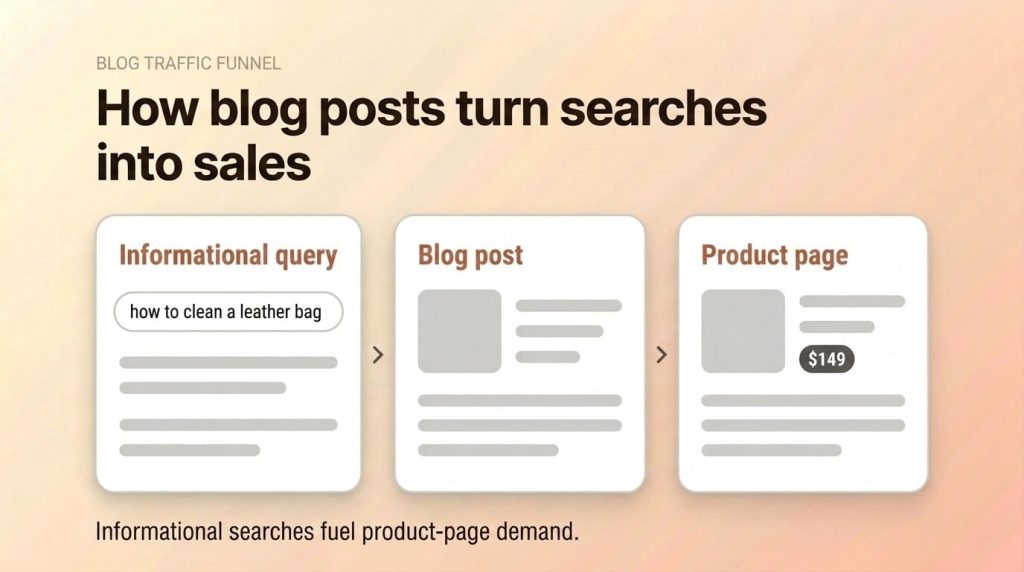
Shopify’s built-in blog is the most underused traffic tool in most ecommerce stores. Businesses with blogs get 55% more website visitors than those without. For Shopify merchants, the blog captures informational search traffic and funnels it toward product pages. This guide covers how to set up your Shopify blog for SEO, what to write, how to link it to products, and how to measure whether it’s driving revenue.
Part of our Shopify SEO guide.
Does Shopify Have a Blog?
Yes. Every Shopify store includes a built-in blogging tool at no extra cost. You’ll find it under Online Store > Blog Posts in the Shopify admin. It supports categories, tags, featured images, SEO meta fields, and custom URL handles. There is no app to install, and there are no extra fees.
Shopify Blog Terminology
Shopify’s naming convention confuses most merchants. In Shopify, “Blogs” are categories, not individual articles. “Blog Posts” are the individual articles that sit inside those categories. Think of a Blog as a folder and Blog Posts as the files inside it.
Every new Shopify store comes with one default blog called “News” located at /blogs/news/. You can rename this blog, delete it, or create additional blogs with their own URL structures. Each blog gets its own feed page listing all the posts within it.
What Can You Do with the Shopify Blog?
The blogging tool covers the essentials. You get a rich text editor, custom URL handles for each post, meta title and description fields, featured image uploads, tag support for organizing content, and author attribution. It also supports HTML editing for merchants who want more control over formatting.
What It Doesn’t Do
Shopify’s blog has real limitations. There’s no native table of contents. Categories don’t nest, so you can’t create subcategories within a blog. There are no custom post types or custom fields without metafields or apps. Scheduling is limited to draft or published states. RSS feed customization is minimal, and there’s no built-in commenting system without a third-party app.
Pro Tip: Create a second blog called “Guides” or “Resources” alongside the default “News” blog. This separates educational content from company updates, giving each its own URL structure (/blogs/guides/ vs /blogs/news/). Educational content typically drives more organic traffic than company news.
Why Does Blogging Drive Traffic to a Shopify Store?
Blogs capture informational search traffic that product and collection pages can’t rank for. When someone searches “how to style a leather messenger bag,” they’re not ready to buy yet. But they are your future customer. Ecommerce SEO delivers an average 3.2x ROI with an 8-to-9-month break-even window according to First Page Sage’s 2025 benchmark study of 80 ecommerce clients, and blog content is one of the primary drivers of that return.
Different Pages Target Different Search Intent
Your Shopify store has three types of pages that each serve a different search intent. Product pages target transactional keywords like “buy leather messenger bag” or “order canvas tote.” Collection pages target commercial investigation keywords like “best leather bags for work” or “top crossbody bags.” Blog posts target informational keywords like “how to clean a leather bag” or “what is full-grain leather.”
Informational searches make up the largest share of all search queries. Without a blog, your store is invisible to this entire segment of your audience.
Blogs Earn Backlinks Naturally
People link to helpful articles, not product pages. A well-written guide on leather care or a detailed comparison of bag materials attracts links from other bloggers, journalists, and resource pages. Those backlinks strengthen your entire domain’s authority, which lifts rankings for your product and collection pages too.
Blogs Build Topical Authority
Publishing multiple related articles on a subject signals to Google that your store has genuine expertise. A store that sells leather bags and publishes 15 articles about leather types, care methods, and styling advice demonstrates authority that a competitor with zero blog content can’t match. This topical depth improves rankings across your entire site.
What Should a Shopify Store Blog About?
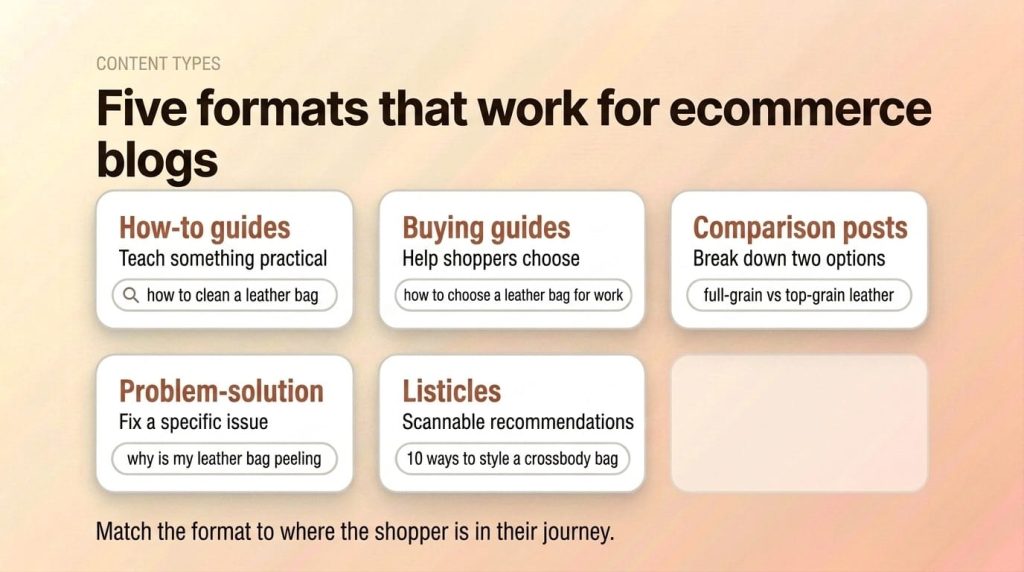
Write content that answers questions your target customers ask before, during, and after purchasing your products. The best ecommerce blog content connects to your product catalog through natural context. Here are the five content types that consistently perform for Shopify stores.
How-to Guides
How-to guides teach your audience something practical related to your products. They work because they match high-volume informational queries and the reader walks away trusting that you know the product category. Example keyword: “how to clean a leather bag at home.”
Buying Guides
Buying guides help shoppers make purchase decisions by explaining what to look for. They bridge informational and commercial intent, making them ideal for linking directly to product pages. Example keyword: “how to choose the right leather bag for work.”
Comparison Posts
Comparison posts break down the differences between two options your customers weigh against each other. They capture search traffic from people actively evaluating products, which makes them high-conversion content. Example keyword: “full-grain vs top-grain leather.”
Problem-Solution Posts
Problem-solution posts address a specific issue your customers face with the type of product you sell. They attract people who already own similar products and may be ready to upgrade or repurchase. Example keyword: “why is my leather bag peeling and how to fix it.”
Listicles
Listicles compile actionable ideas or recommendations into a scannable format. They earn clicks because the numbered format sets clear expectations. Example keyword: “10 ways to style a crossbody bag.”
The best Shopify content marketing strategy uses all five types. Buying guides and comparison posts drive the most direct revenue. How-to guides and problem-solution posts drive the most organic traffic volume. Listicles perform well on social media and attract backlinks.
How Do You Optimize a Shopify Blog Post for SEO?
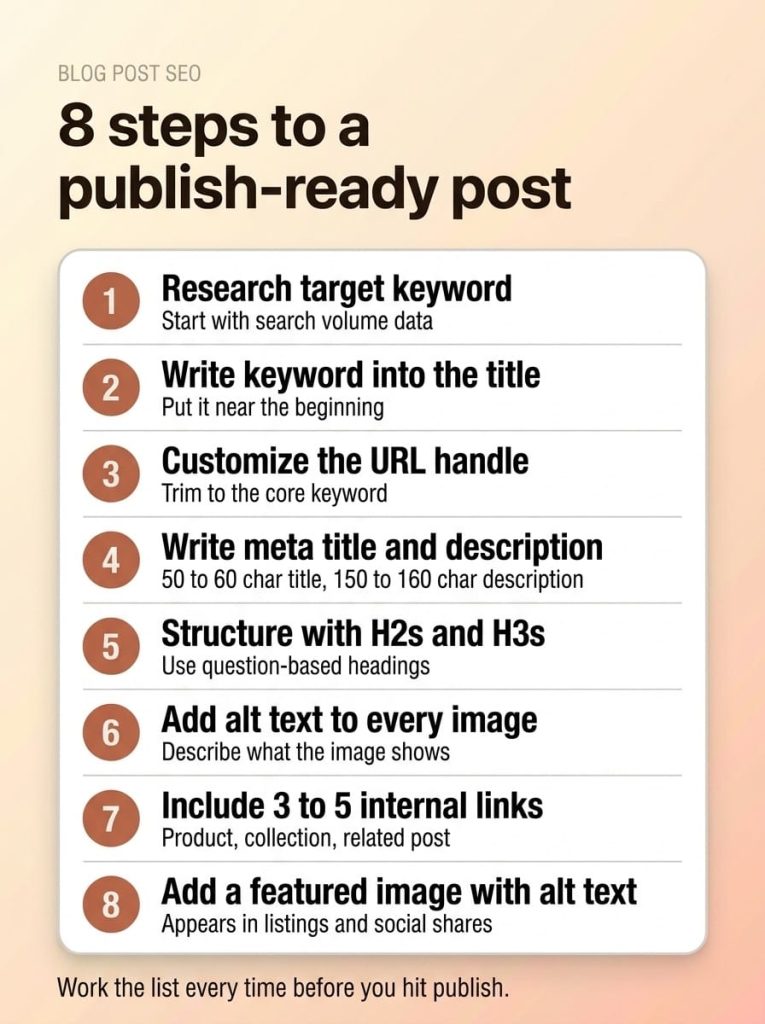
Every Shopify blog post has built-in SEO fields that most merchants ignore. Optimizing these fields takes 5 minutes per post and directly impacts whether Google ranks it. Here’s the step-by-step process for getting each post publish-ready.
1. Research a Target Keyword Before Writing
Don’t write first and optimize later. Start with a keyword that has search volume and reasonable competition. Tools such as Ahrefs, Semrush, or even Google’s “People Also Ask” section help you find what your audience actually searches for. One primary keyword per post. Supporting keywords happen naturally when you cover the topic thoroughly.
2. Write the Keyword into the Title
Your blog post title becomes the H1 tag. Include your target keyword as close to the beginning as possible. “How to Clean a Leather Bag at Home” is stronger than “Our Top Tips for Keeping Your Bags Looking Fresh.” The first version matches how people actually search.
3. Customize the URL Handle
Navigate to Blog Posts > [Your Post] > Search engine listing preview > Edit and set a clean URL handle. Shopify auto-generates handles from the title, which often creates unnecessarily long URLs. Trim it to the core keyword. /blogs/guides/clean-leather-bag beats /blogs/guides/how-to-clean-a-leather-bag-at-home-the-complete-guide.
4. Write a Custom Meta Title and Description
In the same Search engine listing section, write a meta title (50 to 60 characters) and meta description (150 to 160 characters). The meta title should include your target keyword. The meta description should include the keyword naturally and give searchers a reason to click. Don’t leave these as Shopify’s auto-generated defaults.
5. Structure Content with H2 and H3 Headings
Break your post into sections using H2 headings for main topics and H3 headings for subtopics. Phrase many of your H2s as questions — question-based headings match how people search and boost your chances of showing up in AI answers and featured snippets.
6. Add Alt Text to Every Image
When you insert an image in the blog editor, click on it and add descriptive alt text. Describe what the image shows in plain language. Include your keyword if it fits naturally, but don’t force it. Alt text helps Google understand your images and improves accessibility.
7. Include 3 to 5 Internal Links
Every blog post should link to at least one product page, one collection page, and one other blog post. Internal links create pathways for both users and search engines. They pass ranking signals between pages and guide readers toward purchase decisions. For product page optimization, see our Shopify product page SEO guide.
8. Add a Featured Image with Descriptive Alt Text
The featured image appears in blog listing pages, social shares, and often at the top of the post. Upload a high-quality image and write alt text that describes the image and relates to the post topic. Compress the image before uploading to keep page speed fast.
How Do You Link Blog Posts to Product Pages?
Internal linking from blog posts to product pages is the bridge that turns informational traffic into revenue. Without these links, your blog traffic has no pathway to purchase. Stores with thousands of monthly blog visitors and zero attributable sales are almost always missing this step — plenty of traffic, no connective tissue to product pages.

Link Product Names to Product Pages
When you mention a specific product in a blog post, link the product name directly to its product page. Use descriptive anchor text. “Our full-grain leather messenger bag” is better than “click here” or a generic “shop now” link. This passes topical relevance from the blog post to the product page.
Add “Shop This” Sections Within Posts
Include a brief product recommendation section midway through or at the end of relevant blog posts. Keep it contextual. In a post about leather bag care, a section recommending your leather conditioner and cleaning kit feels natural. A section pushing 15 unrelated products feels spammy.
Link Category Terms to Collection Pages
When your blog post mentions a category of products, link that phrase to the relevant collection page. “Browse our full range of leather messenger bags” sends both readers and link equity to the collection. Collection pages benefit significantly from internal links because they often target competitive commercial keywords.
Build Bidirectional Links
Link from product descriptions back to relevant blog posts too. On your leather messenger bag product page, link to your “How to Clean a Leather Bag” guide. This creates a two-way connection that strengthens both pages. It also keeps shoppers on your site longer by offering useful content when they’re still researching. For more on optimizing product pages, see our guide to Shopify product page optimization that converts.
The Right Number of Links Per Post
Three to five internal links per post is the sweet spot. Every post should have at least one link to a product or collection page, one link to another blog post, and ideally one link to a landing page or resource. More than that can work for long-form pillar content, but most standard posts don’t need more.
Warning: Don’t stuff every blog post with 20 product links. Two to five contextual links per post is optimal. Readers notice when a blog post is just a disguised product page, and they’ll leave. Google notices too. Excessive product linking in blog content can signal thin commercial content rather than genuinely helpful information.
How Do Topic Clusters Work for Shopify SEO?
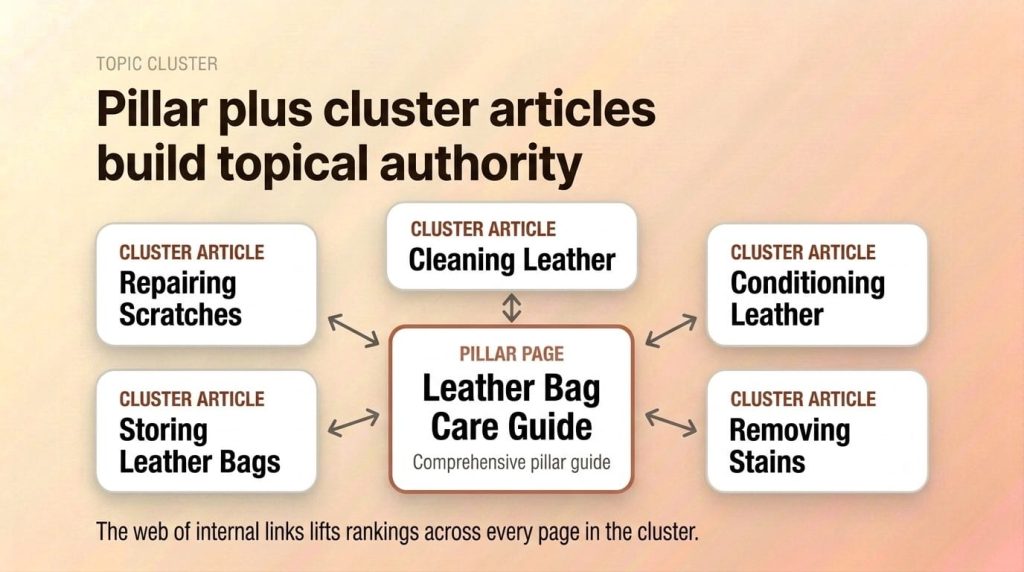
A topic cluster is a group of related blog posts organized around a central pillar page. This structure tells Google your store has deep expertise on a subject, which lifts rankings across every page in the cluster. It is simply one of the most effective Shopify blog SEO strategies available.
Pillar Pages and Cluster Articles
The pillar page is a comprehensive guide on a broad topic. It covers the subject at a high level and links out to each related cluster article. Cluster articles are focused posts that go deep on one specific subtopic. Each cluster article links back to the pillar page.
Example: Your pillar page is “The Complete Leather Bag Care Guide.” Your cluster articles cover individual subtopics: cleaning leather, conditioning leather, removing stains from leather, storing leather bags properly, and repairing leather scratches. The pillar links to each cluster article. Each cluster article links back to the pillar.
Why Clusters Lift Rankings
When Google sees a network of interlinked content on a related topic, it assigns greater topical authority to your domain for that subject. That authority doesn’t just help the blog posts rank. It strengthens your product and collection pages too. A store with 10 articles about leather care and materials ranks better for “buy leather messenger bag” than a store with zero supporting content.
How to Plan a Cluster
Start with your core product category. List every question a customer might ask about that category. Group those questions by subtopic. The broadest grouping becomes your pillar. Each subtopic becomes a cluster article. Use your Shopify SEO checklist to make sure each cluster article is properly optimized.
This article is structured exactly this way. It’s part of a Shopify SEO topic cluster. The pillar is our Shopify SEO guide. This blog SEO article, along with posts on product page SEO and other Shopify SEO topics, are cluster articles that all link back to the pillar.
How Do You Measure Blog SEO ROI?
Most Shopify merchants either don’t measure blog performance or only track pageviews. Pageviews alone don’t tell you whether your blog drives revenue. You need to track the path from blog visit to purchase. Here are the five metrics that matter.
Organic Traffic Per Post
In GA4, navigate to Acquisition > Traffic Acquisition and filter by Organic Search. Then use the secondary dimension to break traffic down by landing page. This shows you which blog posts attract the most organic visitors. Posts with zero organic traffic after 3 months either target keywords with no volume or aren’t ranking.
Assisted Conversions
Blog posts rarely generate last-click conversions. Someone reads your leather care guide today and comes back next week to buy. In GA4, use the Conversion Paths report to see which pages appear in the conversion path, even if they weren’t the final touchpoint. Blog posts that consistently show up in conversion paths are driving revenue, even if the attribution model doesn’t give them credit.
Blog-to-Product Click-Through Rate
Track how often blog readers click through to product or collection pages. Set up GA4 events for internal link clicks from blog posts to product pages. If a blog post gets 1,000 visitors per month and 80 of them click through to a product page, that’s an 8% blog-to-product CTR. Low CTR means your internal linking needs work.
Keyword Rankings for Blog Content
In Google Search Console, go to Performance > Search Results and filter pages by your blog URL path (e.g., /blogs/). This shows you which queries your blog content ranks for, your average position, impressions, and clicks. Track positions over time to see if your content strategy is building momentum.
Revenue Attribution by Blog Post
Create a custom GA4 exploration that shows which blog posts generate the most product page visits that lead to purchases. This requires setting up a segment for users who visited a blog post and made a purchase within the same session or within a defined lookback window.
Pro Tip: In GA4, create a segment for users who visited a blog post AND made a purchase in the same session. This shows you exactly which blog content drives revenue, not just traffic. Export this monthly to identify your highest-performing content types and double down on what works.
What Are Shopify’s Blogging Limitations?
Shopify’s blog is functional but basic compared to WordPress or Ghost. How much that gap actually matters for rankings is covered in our Shopify vs WordPress SEO comparison. Understanding the limitations helps you work around them rather than discover them after you’ve invested months of content work.
- No nested categories: Shopify supports flat “Blogs” and tags, but no subcategories within a blog. Workaround: use tags to create secondary groupings and build tag-filtered pages.
- No native table of contents: You can’t auto-generate a TOC from headings. Workaround: manually code an anchor link list at the top of long posts, or use a free TOC app.
- No custom fields without metafields: Blog posts don’t support custom fields out of the box. Workaround: use Shopify metafields or a content management app for structured data.
- No advanced scheduling: Posts are either draft or published. There’s no editorial calendar or queued publishing. Workaround: use a project management tool to plan content and publish manually.
- Limited RSS feed customization: The default RSS feed includes all posts but offers minimal formatting control. Workaround: use a feed manipulation service if syndication is important to your strategy.
- No native commenting: Shopify removed its built-in comment system. Workaround: install Disqus or a similar third-party commenting app if community engagement matters for your content.
- No content versioning: There’s no revision history for blog posts. Workaround: keep drafts in Google Docs before publishing, or use a version control workflow.
None of these limitations prevent you from executing an effective Shopify blog SEO strategy. They just require awareness and occasional workarounds. The SEO fundamentals, including custom URLs, meta tags, headings, alt text, and internal linking, all work perfectly within Shopify’s blog.
Frequently Asked Questions
Is Shopify’s blog good enough for SEO?
Yes. Shopify’s blog supports custom URLs, meta tags, headings, image alt text, and all the on-page elements Google needs to rank content. The limitations are in content management features like nested categories and editorial workflows, not in SEO capability. Stores using Shopify’s blog rank on page one for competitive informational keywords every day.
How often should a Shopify store publish blog posts?
Start with 2 to 4 posts per month. Consistency matters more than volume. One well-optimized post per week beats five thin posts published in a single day. As you build a library and see which topics drive traffic, you can increase frequency. The key is maintaining quality and keyword targeting with every post.
Should I use the default “News” blog or create a new one?
Create a new blog category for educational content. The default “News” blog works fine for company updates, product announcements, and press releases. But a blog called “Guides” or “Resources” with its own URL structure (/blogs/guides/) performs better for SEO because it clearly signals informational intent to both readers and search engines.
Can blog posts rank in Google Shopping?
No. Blog posts appear in regular Google search results, not Google Shopping. Google Shopping results come from product pages with Product structured data submitted through Google Merchant Center. Blog posts rank in the standard organic results and can also appear in AI Overviews, featured snippets, and People Also Ask boxes.
What’s the ideal blog post length for Shopify?
1,500 to 2,500 words for most ecommerce blog posts. Pillar pages can go to 3,000 to 4,000 words. Shorter posts under 1,000 words rarely rank for competitive keywords because they can’t cover a topic with enough depth. The right length depends on the keyword. Check what’s ranking on page one for your target keyword and match or exceed that depth.
Start Driving Traffic with Your Shopify Blog
Shopify’s blog isn’t a side feature. It’s a traffic engine that captures informational search volume your product pages can’t reach. Write content your customers search for, link it to your products, organize it into topic clusters, and measure the revenue impact. Stores that treat their blog as a revenue channel consistently outperform those that treat it as an afterthought.
The full Shopify SEO strategy is in our definitive guide, and the 30-step checklist tracks execution. If you’d rather have the work done, our Shopify SEO services cover content strategy and blog implementation.